Do Spreadsheets have the TODAY formula or something similar to automatically update dates?
Completed-

You betcha @...!
0
Somewhat good news today (pun intended). I'm pleased to say that support for the TODAY formula in Workiva has been earmarked for the future product roadmap. There's no specific timeline as of yet for when work will begin but wanted to send over the good vibes in 2022. We'll continue to take in new requests and feedback here, so keep 'em coming. Many thanks for your patience and keep staying great!
0
Hi Mike,
I just wanted to see if the "=today()" formula was slotted into any specific quarter for 2022 yet? Thanks!
0
Hi Joseph!
Support for the TODAY formula has not been picked up as of yet for any particular quarter. It's still earmarked for 2022, so perhaps at the earliest right now would be Q3. It's definitely very popular and I have great faith it will get addressed this year.
0
Any updates on this formula? It will be so helpful! Thank you.
1
Hi Bruna!
No new update, unfortunately, as this is not currently on the list for Q3 2022. Right now it is possible for Q4 but perhaps more likely for Q1 2023. Sorry I couldn't provide any better news. Thanks much and we'll be sure to keep you updated as always. Cheers!
0
Just adding to this thread to express my desire for the TODAY() formula to be added. Glad it is in the works. Looking forward to using it soon.
0
I want to chime in to add my desire for the TODAY() formula. It would be nice to have ASAP.
0
We've given up waiting on this. Wanted it for our Close Checklists. Found Blackline's Task Management works much better, so we've switched.
0
David Gillich We did the same thing and switched over to Blackline. It would have been nice to have everything in one place, but the functionality just works better for email notifications, dashboards, and certification of tasks.
0
Thanks for your candor here, David and Jamie.
I completely understand your need to find a solution. The TODAY formula in Spreadsheets is something that we do want to prioritize but that being said, there are some improvements in flight we are making to power up our solutions which is pushing back the delivery of this feature. We are eager to get this shipped just as soon as we can. Thanks much and chat soon!0
Hi Mike Davis, any updates on this matter?
TODAY formula should be sort of an easy improvement in the platform and it makes a big difference for some interesting features based on dates that currently are not possible to automate without it.
Please add me up on the supporters list too.
0
Hi Pedro Andrade!
Thanks for the note. No new updates here, I'm afraid, though the good news is this does remain on the product roadmap to be added. No timelines to speak of as of yet, though. Happy to get you added. I'll pass along your feedback here as well. Holler if you have any questions for me in the meantime. Cheers!
0
Hi Mike Davis,
As mentioned by others, I would be very supportive of this added functionality. It would be helpful to include these timestamps to the bottom of documents in case they happen to be exported from Workiva. As such, could I also be included to the list of individuals who would be interested in the added functionality and notified when it becomes available.
Thanks - Matt
0
You bet, Matt! Happy to get your feedback shared with our team for their added consideration. Thanks for chiming in!
0
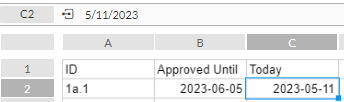
It would be ideal to have TODAY() available in spreadsheets. It's a workaround and requires Wdata, but CAST (CURRENT_DATE AS DATE) AS "Today" can be used in a query and connected to spreadsheets. Once connected, I can use it as a lookup column for another sheet calc or use it directly in the connected sheet.
 0
0
Hi Mike Davis any news on when this is likely to go live? it would be so helpful and it seems i'm not the only one interested in the functionality over the last few years!
1
Hi Tom Brown! I don't have a timeline for when on this one yet, though our product team is in flight on planning out Q4. I should know if this makes the cut for 2023 soon and will let ya'll know here for sure. In the meantime, we've got your connected on the backend and will keep you apprised as well. Thanks for chiming in and have a great day!
0
Hi Mike Davis, how are you?
What is it required from the community to set "TODAY" formula as a priority?
I have followed this post for quite some time now and I noticed is being planned since 2022, and honestly, "TODAY" formula enables several very interesting and automating use cases for our most "tech savvy" clients".
I hope this could be a feature for the Q4.
Thank you again for constantly supporting us and keeping us updated.
0
Hi Pedro!
I'm doing well, thanks. Hope the same for you too 😊
The TODAY formula is definitely a popular request and while it has remained planned its yet to get the red carpet treatment. I would agree, it would open up a lot of simple automations in Spreadsheets, for sure.
I should have a good sense on where it lands in Q4 soon. I'm confident it will get done, it's just a matter of when.🤞
And thanks for the kinds words. Happy to share your voice to our product team. Appreciate your contributions as always.
1
We would absolutely use the "today's date" formula. Currently, we have to go into spreadsheets we use every day and manually type in the date.
0
hi any update on this - seems like a popular request - def heard some chatter on it at the amplify conf
0
Hi Shreya! As of today (pun intended) this is still planned but not yet earmarked for work. It does remain quite popular though and will be moved to the 2024 roadmap. Hopefully we'll see it soon next year.
Thanks for your contributions and happy Friday!
0
Hi, Adding to the list of users that would greatly appreciate a TODAY() function in spreadsheets.
0
Hello Danica, we've added you to the list Thank you!
0
Has this been addressed?
0
This has not been addressed yet but, I'm happy to add you to our notification list for automatic updates!
0
this was requested 6 years ago, is there anything we can do to hurry up the request?
0
Tom Brown Thank you for reaching out and for your continued interest in the TODAY formula feature. We understand the importance of this functionality and appreciate your patience.
Our engineering teams at Workiva plan their work on a quarterly basis, focusing on key product releases. Prior to the start of each quarter, we work to compile data on the feedback you've provided over that span and in turn share your top requests with the our product managers. That data goes into their planning when prioritization work for the next quarter. If you're looking to "hurry up" the request, the best thing to do would be to continue sharing your interest and encouraging others to as well!
The TODAY formula is on our long term roadmap and remains on our radar. We recognize the value it would bring to our users and share your desire to see it implemented. The complexity of this feature means it requires careful planning and significant development resources, but please rest assured that it is something we all want to see come to fruition.
In the meantime, if the TODAY formula is critical for your operations, we recommend leveraging Wdata/Chains as an alternative solution if users currently have it. Your CSM's can provide more information on this process. This can provide some of the functionality you need while we continue to work on incorporating the TODAY formula into our platform.
0
For users who have wdata you can create a SQL query similar to this one as a work around. This idea was originally posted by Michael Sanchez.
1) Create this query in wdata
SELECT
CURRENT_DATE as today2) Create a new workbook, or use an existing workbook to connect to the query you created. It should be a workbook that will not need to be duplicated each year during your roll forward process. There is no need to have multiple versions of this floating around.
3) Create an incoming connection from the query to your workbook.
4) Create a chain in wdata that has two commands from the 'Workiva' > 'Connection Management' library.
5) The first command you need is the Refresh Connection'. Start your chain with this. Enter the connection id as the variable for this command. The connection ID is available from the connected worksheet. Click on the connections icon to open the connections panel on the right side of the screen. Select the connection and click 'view properties' from the drop down menu. The connection ID will be present in the properties info.
6) The second command you need is the 'Publish Spreadsheet' command. Drop this onto the workspace as the second part of the chain. In the variable setup for this chain enter the spreadsheet id. The spreadsheet id is found in the URL of the workbook with current date you want to publish. Don't confuse it with the sheet id, which is different. In the URL it will be the hex formatted string following "/spreadsheet/" in the URL.
Inhttps://app.wdesk.com/a/[Workspace ID]/spreadsheet/[Spreadsheet ID]/-1/sheet/[Sheet ID]
7) Set up the chain to run on a daily schedule to keep the date current in the spreadsheet and published to any workbooks that need it.
8) Create links using the date as the source link as needed.
1Please sign in to leave a comment.
Comments
69 comments