Root Path for Json
RespondidaHello,
I'm using HTTP Get node to connect to Databricks catalog and I can see the data in the format:
{"statement_id":"xyz","status":{"state":"SUCCEEDED"},
"manifest":{"format":"JSON_ARRAY",
"schema":{"column_count":2,"columns":[{"name":"account_id","type_text":"STRING","type_name":"STRING","position":0},
{"name":"account_description","type_text":"STRING","type_name":"STRING","position":1}]},"total_chunk_count":1,"chunks":[{"chunk_index":0,"row_offset":0,"row_count":2}],
"total_row_count":2,"truncated":false}, "result":{"chunk_index":0,"row_offset":0,
"row_count":2,
"data_array":[["1234","abc"],["5678","xzy"]] }}
However when I try to use JSON to CSV node to convert the data before I load to Wdata table I keep getting the error. 'Result: Error: path not found.'
What should be the appropriate 'Path to root' and 'Column mappings to JSON Path' in this case?
Appreciate your help !!
-

Hi Bharath Goolla,
Make sure you're passing in the correct JSON file into the Convert JSON to CSV Command. The sample payload you provided should produce output for the statement_id field. If you need more than that column in your CSV file, consider using the Handlebars Connector.
If you're still getting an error, please post the full LOGS tab output of the failed command, excluding any sensitive data or information.
0
Hi Jeff,
Thanks for your response. I tried using the Handlebars Render File Template Node but it results in timeout error.Unable to download resources associated with command. Please contact support if error persists.
0: error downloading with 2 retries: Get "https://10.abc.25.25:0/secure_download?executor_id=5XXXXXXXX&file=AccountResult1785168639240.txt": dial tcp 10.abc.25.25:0: i/o timeout
Please take a look at the Handlebars configuration and suggest a fix.
Template:
account_id,account_description
{{#each result.data_array}}
{{#each this}}{{this}}{{#unless @last}},{{/unless}}{{/each}}
{{/each}}
Inputs:
Thanks !!VARIABLE
VALUE
Template
account_id,account_description {{#each result.data_array}} {{#each this}}{{this}}{{#unless @last}},{{/unless}}{{/each}} {{/each}}JSON Variables
[{"isList":false,"name":"data_array","value":"AccountResult1785168639240.txt"}]Variables
[]
0
Hi Bharath Goolla,
The issue doesn't appear to be with the JSON or Handlebars template itself. Based on the error message, Chains is unable to download the file. Specifically, Chains is attempting to retrieve the file from "https://10.abc.25.25:0/...", but the connection is timing out:
dial tcp 10.abc.25.25:0: i/o timeout
This is a connectivity issue rather than a Handlebars template configuration issue. You'll need to resolve the file download/connectivity issue first so that Chains can access the file.0
Thanks Jeff, I was using the CloudRunner for the Handlebars node while the prior HTTP Request Get and Post nodes were using the GroundRunner.
I tried using the same Ground Runner for Handlebars and here is the errored logs.⚙️ RenderFileTemplate Configuration:
Template file: account_id,account_description
{{#each result.data_array}}
{{#each this}}{{this}}{{#unless @last}},{{/unless}}{{/each}}
{{/each}}
JSON Variables: [{"isList":false,"name":"data_array","value":"AccountResult1785171727585.txt"}]
Report type: []
Command description: Takes an input file template and renders it with the variables replaced.
Error rendering template: CreateFile account_id,account_description
{{#each result.data_array}}
{{#each this}}{{this}}{{#unless @last}},{{/unless}}{{/each}}
{{/each}}: The filename, directory name, or volume label syntax is incorrect.
Result: Error rendering template: CreateFile account_id,account_description
{{#each result.data_array}}
{{#each this}}{{this}}{{#unless @last}},{{/unless}}{{/each}}
{{/each}}: The filename, directory name, or volume label syntax is incorrect.0
Hi Bharath Goolla,
Outputs from GroundRunner cannot be accessed by CloudRunner. If GroundRunner is required, I recommend using the same GroundRunner throughout the Chain.
For the new error, the log indicates a different issue. You're using the Render File Template command, which expects a template as a file as input. Instead it looks like you have used the template text directly. You're likely looking for the command Render Text Template instead. But if you want to use Render File Template, you'll first need to store the template in a file and then provide that file as input.
If you haven't already, I also recommend reviewing this post on Handlebars in Chains, along with the documentation it links to: https://support.workiva.com/hc/en-us/community/posts/27575610703636-Get-Started-with-Handlebars-in-Chains.
0
Hi Jeff Hickey,
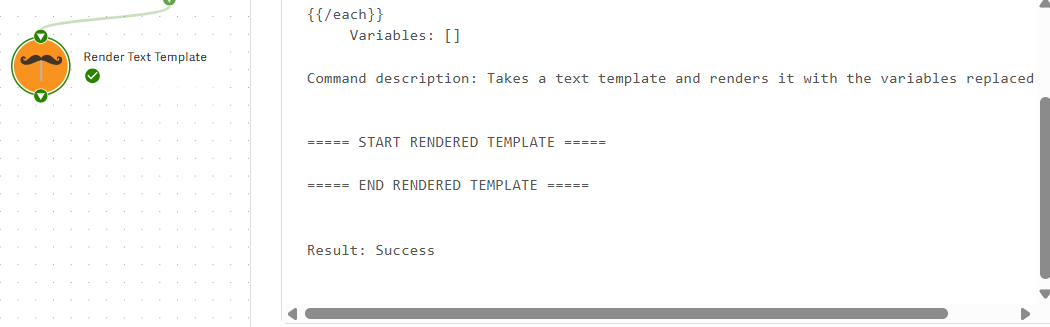
Thanks for the tip. I was able to run the Render Text Template Node successfully but I'm not able to see the data in the output.
Here I attached the template I used to get the Statment_Id. My goal is to get the Data_array I posted in the very first comment.
Can you suggest the template configuration to extract data_array please.Thanks,
Bharath G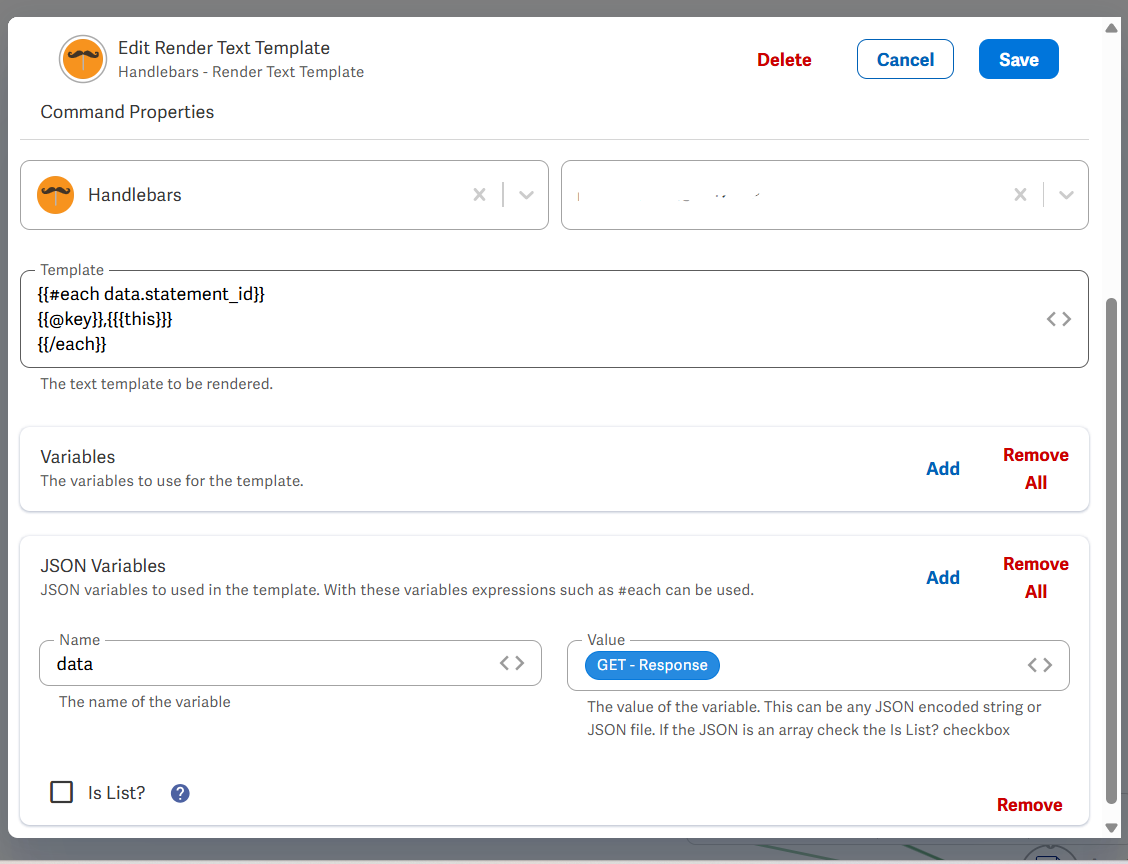
 0
0
Hi Bharath Goolla,
Here's is an example of how to retrieve the data_array values from your sample data. This should help you get started with a working template.
0Por favor, entrar para comentar.
Comentários
7 comentários