Bulk Remove all Links -function deleted
VoltooidBulk Remove all Links -function deleted (without any information that this will be done). This kind of function is very much needed, so please provide an alternative way to delete links
-

Hi Maria Hämäläinen de Bastidas
Thank you for sharing your feedback and the concerns.
You are correct, and others might have noticed, Bulk Link Removal was released on Feb 17th and subsequently disabled the 26th.
We are actively working to update our support article to make relevant changes to reflect the current version of the product. We apologies for an issues this may have caused. While we are unable to share specific timelines on when this capability will be made available, we hope to get back to you soon.
We understand this workflow was useful for some reporting scenarios, and would love to better understand your needs. If you'd like to share any additional details around this impact to you, I'm happy to pass it along to our product team.
In the meantime, users can continue to remove links by bulk selecting links within the file in a selection of text and clicking on Remove Links, or remove links from file during file copy (Refer to this article).0
Hi Isabel,
Thank you for your quick answer.
The need arises whenever, for any reason, a copy of the actual document is required. It is better to take the copy with links to the original master spreadsheet so that the links update accordingly, but once the copy is no longer needed, removing all links at once is the safest and most efficient way to do this.
Links may need to be removed both to keep the document as unchanged as possible and to keep the master spreadsheet clean, with links only to the documents that are actively used. Deleting links section by section is nowhere near as efficient as bulk deletion when the document contains a large number of sections, nor is it as safe, as selecting links individually requires manual work and some links may easily be missed.0
Hi Maria Hämäläinen de Bastidas,
Thank you for sharing your use case, I'll bring this directly to our product teams. In the meantime, we have successfully updated our support article to reflect this change.
0
Good news!
This setting has been brought back with an improved interface to ensure no accidental deletions of links.
You can find the button once again under the Data tab and then the Linking icon. Once selected, a new pop-up window appears. On this window you must confirm the action by typing "remove links" and the click the button to finalize. Here's a screen shot of that window.
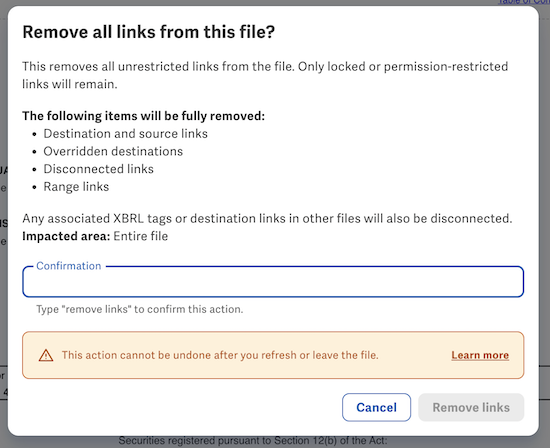
Thanks again for bringing this up and for your patience while we worked on an improved solution. Let us know if you have any feedback or follow-ups. Have a happy Friday in the meantime. Cheers!
0U moet u aanmelden om een opmerking te plaatsen.
Opmerkingen
4 opmerkingen