Exporting a document to DOCX With Comments Included
BeantwoordIt would be very helpful to be able to export our 10-Q/K in .docx format with comments included in the export. Currently it seems it is only possible to export a document with comments included as a pdf. We are currently having to manually add every single comment back into the Word document before we send to our larger SLT for review which takes hours each quarterly cycle.
1
-

Looking back at this Community post, it looks like this functionality does exist! To export a 10-Q document to DOCX format with comments in Workiva, follow these steps:
1. Open Export Options:
- Navigate to the Filetoolbar and selectSave As.2. Choose DOCX Format:
- Under the Exportsection, selectDOCX (.docx).3. Include Comments:
- Open the Advanceddropdown menu.
- Check the option for Include comments.4. Export the Document:
- Click Exportto finalize the process. The document will be downloaded with all open and resolved comments included.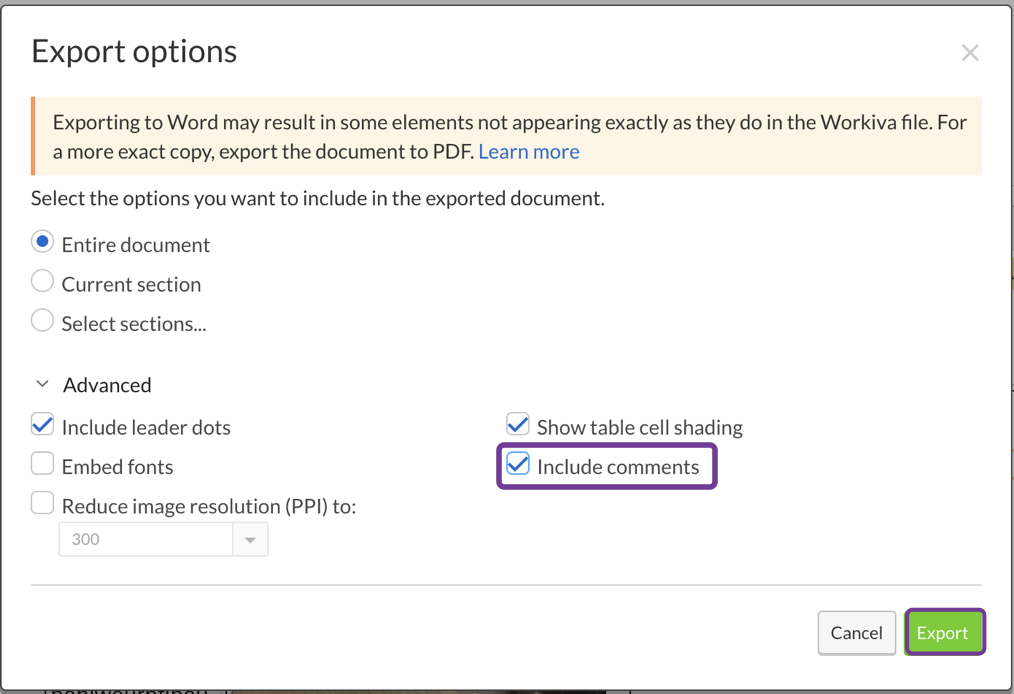 For further details, you can refer to the following Workiva support documentation on exporting documents.Let me know if you need additional assistance along the way!0
U moet u aanmelden om een opmerking te plaatsen.
Opmerkingen
1 opmerking