Retrieve a list of activities for an organization API
RespondidaHi,
I am attempting to retrieve a list of logins for our entire organization for the past three months. Ideally, this chain will be scheduled and set to run at the end of each quarter to retrieve an updated file. I am iterating over the 'data' variable from the GET command's JSON response. I am then using the JSON - Object to CSV command to turn the activityDateTime and summary into columns for my file. lastly, I am stacking the responses from the JSON - Object to CSV command using the Stack Files Command.
I see there should be upwards of 9,000 results here based on my UI activity list, however, this chain instance is only processing 100 records at a time and stops iterating after this. I am aware that the @nextlink variable from the GET JSON response can be used to get the next set of results, but I am not sure how to implement it or configure my chain to process the rest of my results. Is this something anyone can advise on? Thanks!


-

Hi Talia Test, You're on the right track with the @nextLink! You can configure the Group Node to loop until you have iterated over all pages of the Retrieve a list of activities for an organization endpoint. Use the URL value in @nextLink to make additional GET requests within the Group Node as needed until all pages are retrieved. After all pages are retrieved, exit the Group Node and continue on with any other logic of your chain.
0
Hi Jeff! Thank you for your response. Would I then need to change the group command iteration type to "Repeat Until" instead of "List"?
 And would this be the new chain structure with the @nextlink in the URL field of the new GET command?
 0
0
Hi Talia Test. You're correct that you'd use the Repeat Util. You could then either configure the rule within the Repeat Util window in the Group to break out of the loop, or include a conditional to check if @nextLink does not have a new URL and an Exit Group Event to break out of the loop.
There are a few ways to handle this within the Group. For example, you can use the GET command's Previous Response to get the new @nextLink value, or use a Dynamic Chain Variable and update its value with the current URL value.
0
Thanks Jeff Hickey! I have this chain structure with the following command configurations:


I think where I am stuck is how to retrieve the previous response from the GET command since it is before the group iteration. Based on your response, I think this ties into the conditional command, which I have left blank as I am not sure how to configure that to check against previous response. Am I correct to use the 'Repeat until @nextlink is blank' logic in the group iterator and the group iteration response for the URL in the second GET command?
It would be great if there was a chain with a similar structure I could follow. Are there any chain templates or previous community posts with a similar structure to mine that could get me on the right track? It would help to see the logic. Thanks again for your help!!
0
Hi Talia Test,
There are a couple of ways to configure this. An easy way to do it would be to not have the first GET outside of the Group Node because you want it to always do at least one iteration. Check if a @nextLink value exists and repeat. If a value doesn't exist, then exist the group. You can configure the Group Node to simply just repeat or configure a dynamic chain variable to and check for 'false' (or something similar) and allow the Group Node to continue while the value is not false. I am happy to provide more details if this is not clear.
0
Hi Talia, Jeff,
I am also trying to use Stack Files command in my chain.
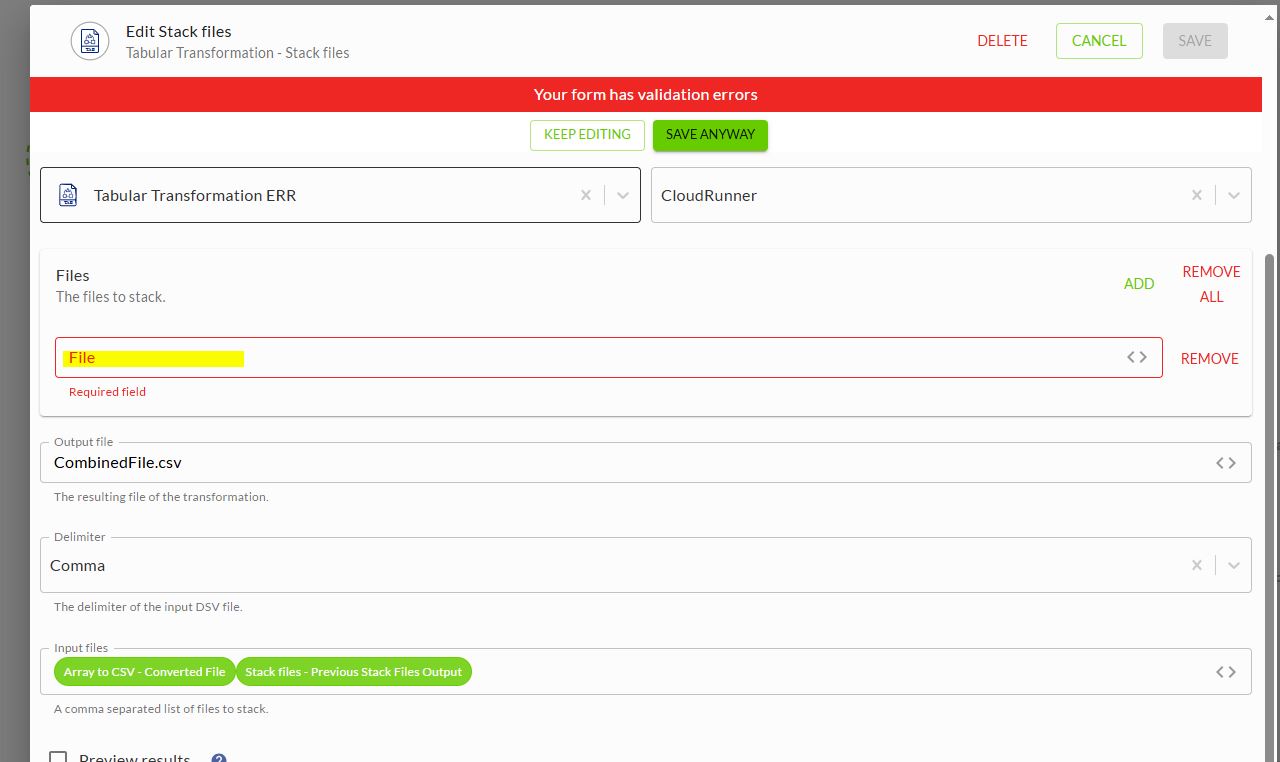
I am getting error. Do we need to enter something in the Files textbox?
 0
0
Hi Srikanth Adi, try adding a comma in between the two files in the Input files field. This must be a comma separated list of files to stack. Next, click "REMOVE" next to the blank File field that has the error. With these two fixes, you should be able to save the command and stack the two files.
You can use the Stack Files command a couple of ways. You can either configure the files to stack by adding them within the Files area. Or you can pass in a comma separated list of files in the Input Files area. More information about the command is located here https://support.workiva.com/hc/en-us/articles/360035645892-Tabular-Transformation-commands#h_01HEXKDYC1W6VEXVYQ5V6Z6W8Y.
0
Thanks Jeff. I was able to do the other way you mentioned in other post.
0
Great, glad you got it working! I will add the link to the other post here for anyone in the future that may also need to reference it: https://support.workiva.com/hc/en-us/community/posts/42341145514516/comments/44148049227156
0Iniciar sesión para dejar un comentario.
Comentarios
9 comentarios