Using Control Sheets
Looking to take your orchestration of Chains to the next level? Time to explore Control Sheets!
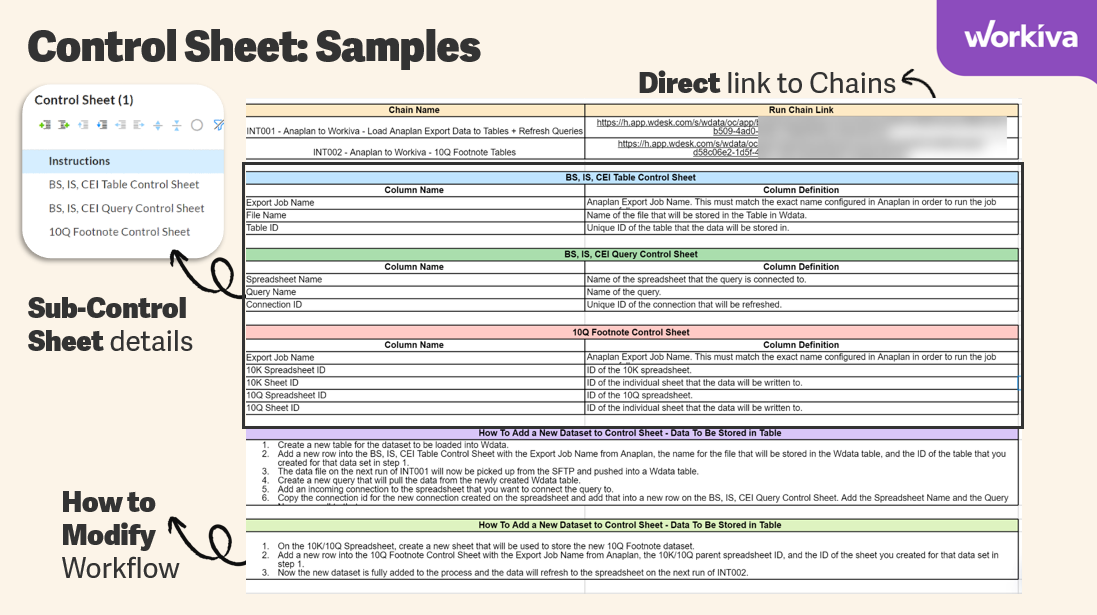
Think of Control Sheets as your workflow's control panel or instruction manual. It's where you pre-enter all the necessary data to ensure everything runs automatically and efficiently, providing workflows with the information they require and minimizing the need for constant manual adjustments.
By creating and leveraging a Control Sheet, users can:
- Define Input Values that will be passed to a Chain on each execution
- Define Flags that will determine if a chain should perform certain operations
- Pass values, such as query parameters, rule names, or date filters, into the system workflow when executing a chain or running a rule.
- Perform pieces of Roll-forward operations
- Manage the ID's for artifacts within Workiva
- Log the execution status of a workflow
Some benefits and use cases for Control Sheets include:
- Simplifying Integrations for Users: This gives users control over which files to pull from a source system, where that data should land, and lets them apply active flags—all within a spreadsheet. It reduces complexity and makes the process more user-friendly without needing any manual intervention in Chains themselves.
- Logging and Permissions: Often used for Chain logging processes, especially when users don’t have access to Chains and are only provisioned for the Spreadsheet experience.
- Specialized Scenarios: For certain integrations that need dynamic parameterization for URL execution, Control Sheets can be very useful. They let users update parameters like period values, entity values, etc., that get fed into a RaaS report (like in Workday).
Check out the resources below to get started with Control Sheets:
- How Do I Set up a Chain Control Sheet
- CLP - Creating and Reading a Control Sheet
- CLP - Using Values from a Control Sheet
- CLP - Running Processes and Logging Results within a Control Sheet
- CLP - Logging Failures within a Control Sheet

0
Please sign in to leave a comment.
Comments
0 comments