iXBRL cover page tagging requirements
Besvarat-

Hi Valerie - I've tried the same as you mentioned and had no luck either. I also noticed that we also experience errors for the "Security12bTitle," "EntityFilerCategory," and "EntityShellCompany" tagging. Do you run into these errors as well? 0
Hi Jeffrey. I'm glad I'm not the only one. I have an error for Security12bTitle too. I think that's because the concept doesn't have an item type...I don't know that there's anything we can do to fix that ourselves but maybe Mike can let us know if there is a fix. :)
Entity Filer Category also gave me an error at first but I changed it to be title case and that seemed to fix the error. I think it's case sensitive.
Entity Shell Company also gave me an error similar to the other checkboxes.0
Hello Valerie, thank you for your response.
I've tried un/capitalizing the Entity Filer Category value and nothing appears to work for me as I continue to get the same error. I also tried copy/pasting from the import template and that doesn't seem to work either.
Hello Mike - I've tried importing the test templates and I agree with Valerie's comment that there are still errors that exists even when inputting the dates on the test document. The check boxes and the items that I mentioned above in the previous post are areas that contain errors. I also noticed there were a few errors on the template as well. For example, instead of "Iowa," the fact value should now be the state abbreviation, or "IA," and for the name of the exchange, it should be "NYSE," instead of "New York Stock Exchange."
Many thanks in advance for your assistance!0
Hello again!
I'm happy to look into this a bit further for you. For the checkbox issues, currently the red visual indicator is expected as its just a known visual issue which our Product Team is working on it. For the items that are syntax based and case sensitive, you'll want to make sure there aren't any extra characters and that it matches what is on SEC for your company. That being said, you should not be receiving a validation error once the check boxes are copied and pasted in and the tagging applied correctly. Here are some steps to try out:- Ensure the document is migrated to the updated 2018 or 2019 taxonomy which includes the DEI info (sounds like you have done this)
- Copy and paste the check box from the imported template (sounds like you have done this as well)
- A red box would show, but when validating, there should be no error
- If there is an error, copy the XBRL on the checkbox, remove the link, copy and paste the checkbox back in, then re-add link and paste the XBRL tag back.
0
I get the red display but no validation errors for the boxes, so I assume working as intended until the visual issue is corrected.
I find the use of codes for many of the cover page items quite frustrating and limiting.
For instance tags like State of Incorporation, Entity State, Entity Country.
These are things that we do not wish to abbreviate on our cover page, and therefore shoved into the non-printing section, which defies the whole point of ixbrl cover page tagging. I don't see why they couldn't have gone with strings for this instead of codes.
Worse of all is the Security Exchange Name tag. Not only does it only accept abbreviated codes, it does not accept TSX or anything pertaining to the Toronto Stock Exchange as a possible value:
Fact has an incorrect or missing fact value, date/date range, or unit (nonNumeric fact dei:SecurityExchangeName type normalizedString value error: TSX, TSX is not in dict_keys(['NONE', 'NYSE', 'NASDAQ', 'CHX', 'BOX', 'BX', 'C2', 'CBOE', 'CboeBYX', 'CboeBZX', 'CboeEDGA', 'CboeEDGX', 'GEMX', 'IEX', 'ISE', 'MIAX', 'MRX', 'NYSEAMER', 'NYSEArca', 'NYSENAT', 'PEARL', 'Phlx']))
I guess the SEC didn't think about those of us that sell our shares up north, I have no way of tagging this currently.0
Yeah I'm with you Kurtis, the limitations of the cover page tags seem unnecessary. Overall to me it seems the SEC kind of had to rush through the creation of the updated 2019 taxonomy to meet their effective date deadline.
Regarding TSX, the SEC is probably just mad that you stole the NBA finals trophy and they wanted to get back at you ;)0
Hello Mike,
Thank you very much for your response and help. I was able to resolve the error on the EntityFilerCategory after a few tries.
Unfortunately, I still have errors on all of the checkboxes. I followed your instructions above and have double checked to ensure I was copy/pasting the correct boxes from the template and applied the respective tagging; however, when I ran validation, I receive errors for "Fact has an incorrect or missing fact value, date/date range, or unit."
I am still also having an error on the "Security12bTitle" (Title of each class) tagging.
As always, I greatly appreciate your help in advance.0
To confirm - off calendar filers can not use the template provided in the link above, correct? 0
Additionally, are all of these facts required to be tagged on the cover page itself? Or can we tag in the non-print section? Management and I are struggling with the change in format once we tag the cells of a table. 0
Hi Megan,
The answer is both yes and no. There will be an updated off-calendar template version also made available on that same article, so you can use the link but you'll want to to wait for the update to the article. We anticipate that will be available early this week. I'll let you know for sure when its there.
Hope that helps answer your question. Give me a holler if you need anything in the meantime. Cheers!0
When I follow the template for the Boolean Item type (copied/pasted the appropriate box from the template to the applicable field for tagging our cover page and entered in/formatted as text) I get the 'displayed value for this fact is incompatable with iXBRL requirements' validation error. Please advice. Thanks! 0
Great question! I'm moving to its own conversation and will provide an update soon. Please reference the new conversation here: https://support.workiva.com/hc/en-us/community/posts/360049282691-XBRL-error-when-copy-pasting-checkbox-from-template
0
Moving this question to its own conversation. We'll provide an update shortly. Please reference the new conversation here: https://support.workiva.com/hc/en-us/community/posts/360049511112-Can-cover-page-items-be-tagged-in-a-non-printing-section-
0
Thanks this is helpful.0
Hi Jeffrey!
Thanks for the follow-up, and the extra info. I'm doing a little digging to see if I can replicate your first issue with the checkboxes and the validation error. In the meantime, it might be worthwhile to have your CSM, PSM or our 24/7 Support Team take a closer look and help diagnose the root cause.
Regarding the Security12bTitle issue, our Support Team has discovered an item which is causing a false error on that tag. We anticipate having that addressed here soon so at this time its safe to ignore that. I'll let you know for sure when that's addressed.
Holler if you need anything else in the meantime. Thanks!0
Thank you for everyone's inputs!
I understand currently we don't need to worry about red visual indicators for checkbox since Workiva team is fixing it. But we also have an error for "title of 12(b) security" as follows. Any advice?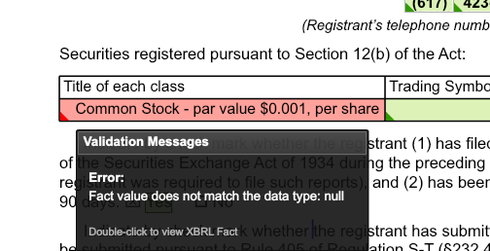
Also, I'd like to confirm if we are filing quarterly report, shall we also need to tag transition report on the top of cover page (since it says "Mark One")?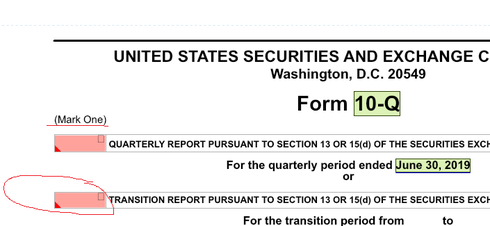
Thirdly, for security exchange name, shall we specify specific market name. For example, shall we use "Nasdaq Global Select Market" instead of general "NASDAQ"? The prior one brings up an error message while the latter looks ok tagging wise. I feel we need to specify in this case but how do we fix the error?
Last but not least, for 8-K cover page tagging, what's the general rules of choosing "Dates/Date Ranges" for XBRL tagging? For example, shall i choose Q2 QTD instead of Q2 YTD for Q2 earnings release? It seems Q/K has certain rules already, but for 8-K tagging, it's not quite clear what rules are for me.
Thanks in advance!0
Hello Grace!
You are correct, those red indicators for the checkboxes are currently a visual only and our team is working on them. And actually, the same error seen for the Section 12(b) Security tag. These will be addressed hopefully soon to help avoid any further confusion.
For your second question, yes, you'd still need to tag the transition report field, in this case with the "false" checkbox.
Regarding the question about the security exchange, this tag is what is called a "transformation tag" meaning it will change to display as expected but you have to tag it in a certain format. For NASDAQ, you actually want to tag it is as "NASDAQ Global Select Market". This will transform into "NASDAQ" for the display. Note that this will show in red in Wdesk, but if you generate and view the SEC and inline viewer, you can see the transformation as expected.
And lastly, for the 8-K tagging dates, we recommend the xbrl dates utilized on the 8-K should be a one day duration of the date of the report on the cover page. Here's some further info: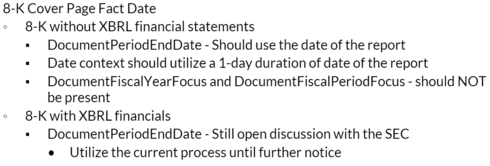
Hope these are of some help. Do let me know if you need any further clarification on the above, or have additional questions for me. Thanks as always and happy tagging in the meantime. Cheers!0
Hi Mike,
Thank you for answering my questions. Just to confirm, for 8-K with financials, we need to utilize the current process, which means we need to tag one day duration, even for quarterly earnings release.
Thanks!0
Hi Grace!
Sorry for the delay in getting back to you, but yes, you are correct. When filing with cover page XBRL is required for 8-Ks, you would want to maintain the same date process, using a one-day duration for the date of the report, even for a quarter earnings release type of 8-K. :)0
Just wanted to let you know that Herb was right on the money, as was finally made more definitive here: https://xbrl.us/qa-sec-fast-act/.
Thanks for the info, Herb! Much appreciated :)0
Hi Mike,
Thank you for reply.
For DocumentFiscalYearFocus and DocumentFiscalPeriodFocus, it seems 8-k tagging is linked to Q tagging. So if i tag YTD for Q, 8-K automatically tag YTD too to those two concepts. I haven't done much testing yet for this, but wonder maybe you have a quick answer.
Thank you!0
Hi Cindy,
Yes! The off-calendar template is currently available from the site. To clarify form our end, there are not two templates but one template. We had to adjust it slightly to avoid any issues importing into off-calendar filing accounts. Either way, the same link above contains that version so you can download that to import.
Sorry for the confusion there, and let me know if you need anything else. Happy importing!0
Hi Mike,
We are also experiencing an error on the Security12bTitle tag. Do you know if this has been resolved yet? Thank you!0
Any update on the status of the off-calendar template? Thanks! 0
Hi Amanda!
Currently you'll still receive an errant message regarding the the tag "Security12bTitle" , meaning the tag will appear red in your document but it is not a true error. At this time I don't have a precise timeline for a fix on this issue, but our Product Team is working diligently on this particular case and I anticipate it being addressed fairly soon. I'll certainly keep this post apprised as soon as its been resolved.
In the meantime, rest assured that generating XBRL at the project level will not show this error, however. Hope that helps answer your question. Do let me know if you need anything else. Thanks for continued patience and have a super day!0
I'm running into the same issue. 0
Hi Cindy and Joel,
The same DEI taxonomy was added to the updated 2018 and 2019 taxonomies, so the elements available for Cover Page tagging would be the same under both taxonomies. At this time we don't have plans to update the template with corresponding 2018 taxonomy tagging data.
Unfortunately, as you point out, copying and pasting XBRL wouldn't be an option across different taxonomies, but you could certainly follow the example PDF with the names of the tags and their location since the tags themselves would be the same.
Sorry I wasn't of more help there. Do let me know if you have any additional questions for me or need anything else. Thanks for reaching out and have a great weekend in the meantime. Cheers!0
I've successfully imported the template, but am having issues using it simultaneously with my 10-Q document. I'm using the updated 2018 taxonomy and the template uses the updated 2019 taxonomy, so it wants me to migrate one of them. Any way to work around this? I really wanted to copy and paste the template XBRL. 0
I am wondering on the Q cover page, can we add xbrl tagging and also show check mark for Quarterly Report? I copy and pasted the template to our cover page, it works fine with tagging except the check mark is missing on the screen and when i save the file as pdf (pdf (beta) and DOCX work fine). Anyone has some issue? And any advice? Thanks!  0
0
Hi Grace!
Thanks for reaching out. I'm happy to help as best I can.
Do you know if your operating system is Windows 10? If so, you are experiencing a known limitation with Window 10 and the font used for tagging these items, Arial Unicode MS. To get around this, you'd need to go about in a couple scenarios, which are actually mentioned in this post.
If this is not the case for you and I've missed the mark, do let me know and I'm happy to keep digging. Thanks again and chat with you soon. Cheers!0Du måste logga in om du vill lämna en kommentar.
Kommentarer
114 kommentarer