Can 1 XBRL Fact have multiple calculation relationships in the same document?
Udzielono odpowiedziBasically we have Net premiums earned presented on the income statement with the calculation relationship Net premiums written + (Increase) Decrease in Net unearned premiums. This becomes an issue because we also present Net premiums earned in our segments results footnote but in this footnote we don't have the (Increase) Decrease in Net unearned premiums so it creates a calculation inconsistency.
Is there any way that I could edit the way Net Premiums earned is calculated just for the segment results footnote?
-

Hi James Reardon,
Technically a concept can appear in more than one calculation relationship, but this is the root cause of your issue. When the same concept (Net Premiums Earned) has two different calculation definitions in the same document — one with all contributors (income statement) and one without a contributor (segment footnote) — XBRL will flag this as an inconsistency because the two or more calculations have differing sets of contributors.Q1: Can 1 XBRL fact have multiple calculation relationships in the same document?From the calculation report documentation, a red inconsistency (error) can be triggered by: "Two or more calculations that are similar, but do not have all of the same contributors. Define both relationships separately."
Q2: Can you edit the calculation for the segment footnote only?Unfortunately, this is a known limitation of XBRL. The calculation relationship is tied to the concept, not to where it appears in the document. You cannot define a separate calculation for the same concept in a different section.
Here are your options:- Option 1: Apply an Axis/Member to the segment footnote fact: Tag the Net Premiums Earned in the segment footnote with a segment axis and member. Per XBRL spec, "fact values that have an axis and member applied will be excluded from the calculation of the total concept." This means the footnote instance would be excluded from the income statement calculation check — resolving the inconsistency.
- Option 2: Mark the inconsistency as correct: If the inconsistency is a valid inconsistency (i.e., the calculation is intentionally different because the footnote doesn't include all contributors), you can mark the SEC validation warning as correct in the XBRL Validation results. This is a filing-acceptable approach.
- Option 3: Remove the calculation from the smaller/footnote section: Per the calculation report guidance, "if the same relationships are defined in another location with additional contributors, remove the smaller calculation."
Option 1 is generally the cleanest solution for segment footnotes, as segment disclosures naturally lend themselves to dimensional tagging..0
Hi Isabel Messore,
Thank you for the response! I have a question about option 1 and 2.
Option 1- I think this is how we have it setup currently.
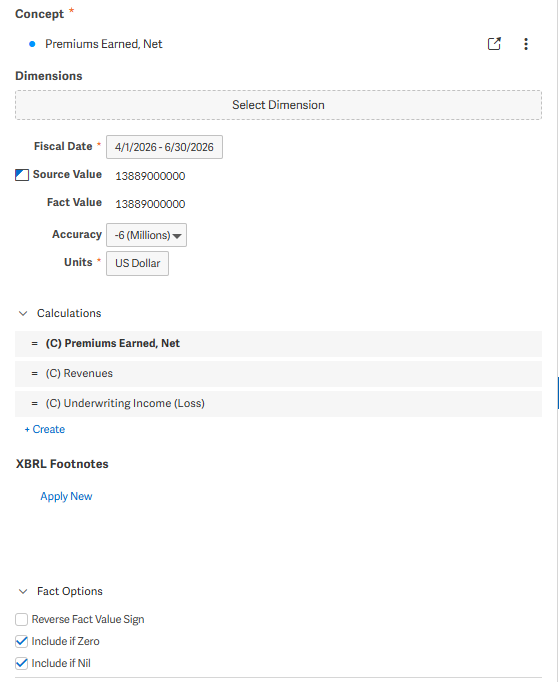
This screen shot is from the tag on our income statement:
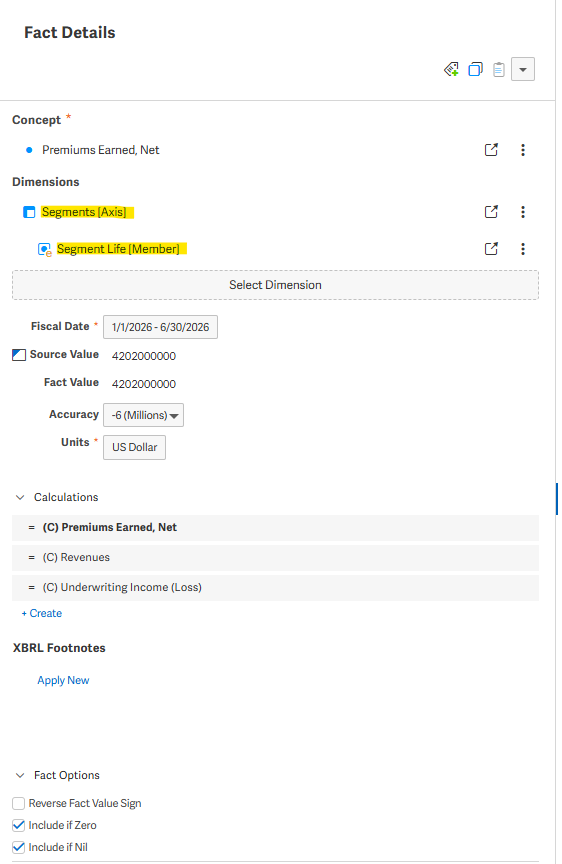
This screen shot is from a tag in segment information:
And then this is part of the Calculation report:
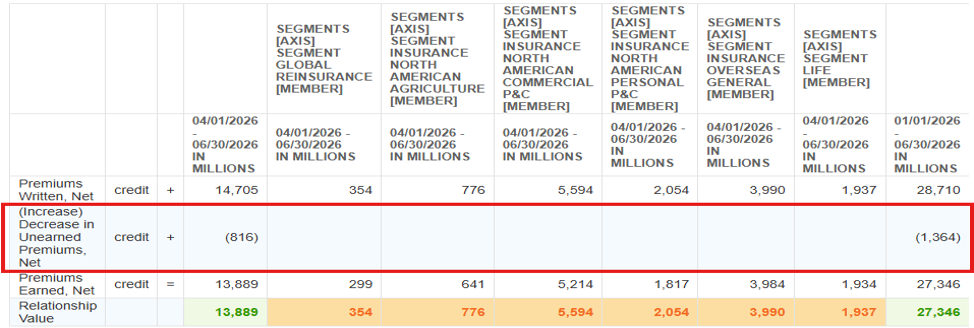
Because we don't present the "(Increase) Decrease in Net Unearned Premiums" in the Segment Information footnote it gets flagged as an inconsistency. But the Segment Information tags do include an axis and member, so should they not be included here?
Option 3- How would you go about removing the calculation from the smaller/footnote section? Its my understanding that the calculation is tied to the concept so wouldn't removing the calculation from the concept remove it everywhere its used in the document?
Thank you so much for your help!
0
Hi James Reardon,
I would say that Option 2 is the best option. As you confirmed, you already have segment dimensions applied in your Segment disclosure and the values are still flowing through into the income statement calculation relationship. This is likely a valid inconsistency if this is just flow through and all the contributors are not included in your segment note.0Zaloguj się, aby dodać komentarz.
Komentarze
Komentarze: 3