Page Numbering in a Word Document
Udzielono odpowiedziHi All.
I am producing a set of financial statements.
In the 'notes to the financial statements' section, there is a number of subsections for each accounting policy (1 to 23).
I am having some difficulty with page numbering.
For note 1, when I inserted page numbering, the numbers would ascend automatically over the next few pages.
I am now on on Note 2, which is located on the same page as Notes 3 and 4. When I insert the page number here it duplicates the same number across a number of pages (the section for Note 4 continues across a number of pages). I cannot individually amend each number (though, I don't want to do this as would like to automate the process) as it changes the number on the previous and subsequent pages as well.
I assume the problem is caused by the subsections and how they flow over different pages.
Any advice on how to fix this?
Thanks in advance!
-

Hi Hassan Qureshi - Thanks for reaching out, happy to help out here! If you click into the footer, a right side panel should pop up containing the Footer Properties. Ensure that the "restart section numbering" box is not selected, otherwise it will restart the page number and have them all contain that same number. I hope this helps, but please let us know if it doesn't and we can try to troubleshoot some more!
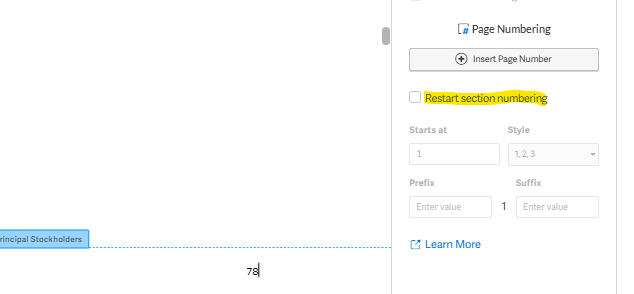
Thanks again!
0Zaloguj się, aby dodać komentarz.
Komentarze
Komentarze: 1