Using if/then for images
We have a document that we would like to use if/then statement to show an image depending on whether or not a criteria is met. So if the criteria is met we would like to show yes/no with a circle around yes and if the criteria is not met i would like to show yes/no with a circle around no. I can do this in excel using images but not sure I can do that in wdesk.
-

Hi Jenniffer!
Great question. I did some testing to see how you to best achieve this in a Spreadsheet, and have a something that might work for you.
Sadly, while you can insert an image into a Spreadsheet cell, if you reference the cell with the image, the IF statement doesn't seem to pull the image in.
As a workaround, I was able to instead insert an emoji of a green circle 🟢 and a red circle 🔴 . Next I created a Data Validation in my Spreadsheet cells for the list of Y and N. And then I created an IF statement to look at cells and if a Y was present, to choose the green circle cell, and the red circle cell for N.
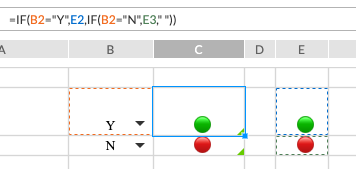
To access the emoji picker on a Windows machine, in a text area use the keyboard stroke Windows button + period (.) or Windows button + semicolon (;). On a Mac (which is what I drive) its Control + ⌘ + Space bar. Any emoji symbol could work and should be recognized by your browser.
Additionally, you could insert a Symbol from the Insert > Symbol option and then use Conditional Formatting to color it if the value in the cell is Y or N.
Hopefully that is of some help. Let me know what questions you have, or if you need anything else. Thanks again and have an awesome day!
0Logg på for å legge inn en kommentar.
Kommentarer
1 kommentar