In the Workiva "Export Query Result" command, what does the "Export as Dataset" option do?
BesvartIn the Workiva connector's "Export Query Result" command, there is a toggle at the bottom labeled "Export as Dataset" as shown here:

The information in the help icon simply repeats, "Optional: Export query results as a dataset," and nothing about this option is listed in the Workiva connector commands documentation.
What does this option do/change? I haven't observed any changes in the data available to subsequent chain nodes regardless of whether this is toggled on or off.
-

Hi Andrew McKenzie
That checkbox means the data will get imported to the spreadsheet as connected so the cells should not be editable except by another dataset update to those cells in the spreadsheet.
Here is the associated Wdata documentation on the endpoint we use in that command0
Thanks for the helpful answer Isaac Oard! Perhaps in the future this will be explained in the commands documentation as well.
0
Hi Andrew McKenzie
We can pass that along to our UX team for their consideration.
Thanks again!0
Hi Isaac,
Can we use ExportQueryResult to write to a presentation table?
Thanks
Sri
0
Hi Srikanth Adi, you can't write data to a table in a Presentation with the Export Query Result command. However, a way to accomplish this is to create an Incoming Connection to the table in your Presentation and then use the Chain to Refresh the Connection as needed.
0
Jeff,
The ExportQueryResult command worked for presentation table as well. Here is the screenshot.
Thanks
Sri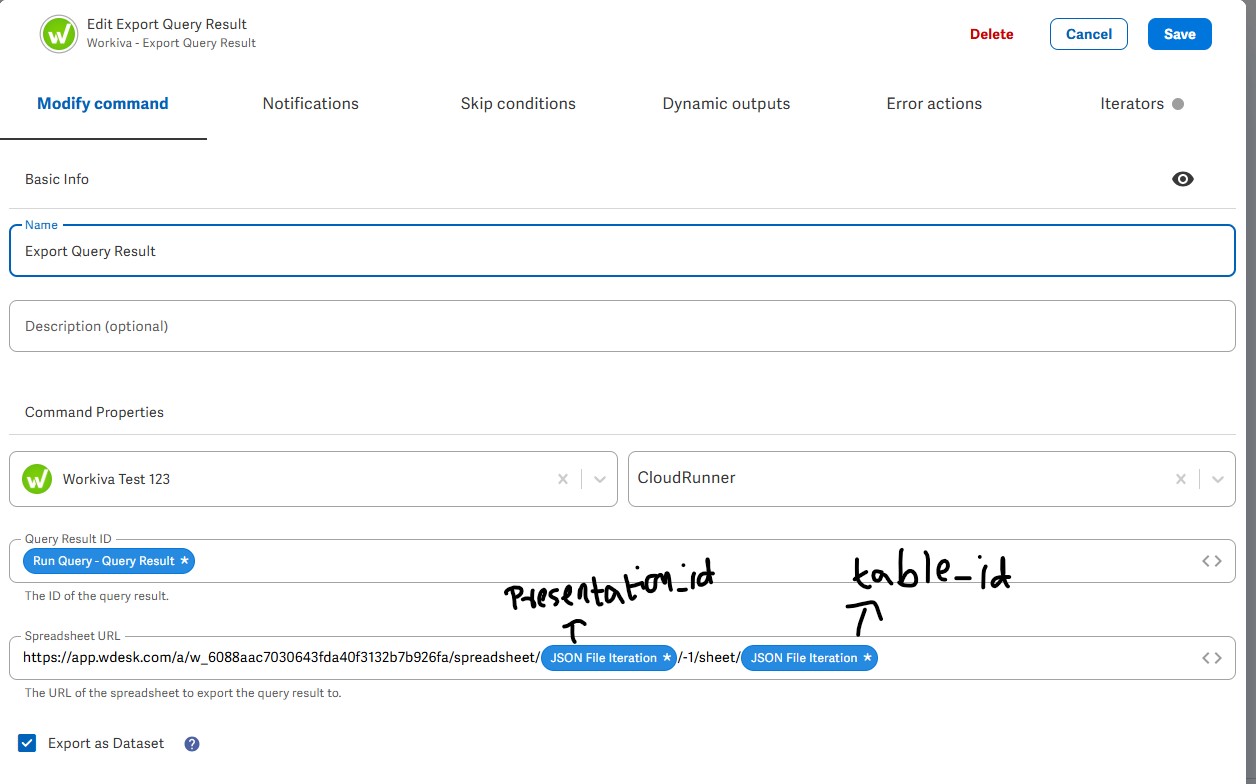 0
0
Thanks Srikanth Adi, glad you were able to figure it out and share it with us!
0Logg på for å legge inn en kommentar.
Kommentarer
7 kommentarer