10 AI Prompts Every Sustainability Team Should Try in Workiva
Hey Workiva Sustainability Community! 👋
Sustainability teams spend enormous amounts of time collecting data. The next challenge is turning that data into insights, identifying risks, and communicating results to stakeholders.
Use AI to move fast.
Use Workiva AI to make the result governed, traceable, integrated, and defensible.
Use these prompts with Workiva AI's Intelligent Companion in your sustainability documents, spreadsheets, and Wdata queries. (Don't see the Workiva AI sparkles icon in your Workspace? Workiva AI is available to any customer who has signed the Workiva AI Terms of Use. Once approved, Workiva AI is enabled by default for the entirety of the organization, including all existing and newly added workspaces and users. Contact your CSM or contact Support to get this enabled today.)
With any AI companion check the output provided. If something doesn't look right, ask AI to verify the work, and know our Support team is standing by 24/7 to get you where you need to go.
In Spreadsheets
Click the Workiva AI sparkles icon to analyze a whole sheet, a range of cells, or a specific cell. Hot tip: use the Data Output sheet on your Factbook to have AI analyze everything!

1. Find What's Driving Emissions Changes
Use when: Leadership asks, "Why did emissions increase?"
Prompt:
Analyze this emissions dataset and identify the top three contributors to the year-over-year change in Scope 1, Scope 2, and Scope 3 emissions. Quantify the impact of each driver and summarize the results for an executive audience.
2. Detect Data Anomalies Before Assurance Does
Use when: Preparing for internal review or external assurance.
Prompt:
Review this dataset and identify outliers, unusual year-over-year variances, missing values, duplicate records, or metrics that fall outside expected historical ranges. Explain why each item may require further investigation.
3. Explain Variances Automatically
Use when: Building management reports.
Prompt:
Review this energy consumption data and generate potential explanations for any location or business unit with a variance greater than 10% from the prior reporting period.
4. Forecast Progress Toward Sustainability Goals
Use when: Tracking targets.
Prompt:
Our goal is to reduce Scope 3 emissions by 30% by 2030. Using the attached historical data, calculate our current reduction trajectory and identify whether we are on track. If not, estimate the annual reduction required to achieve the target.
5. Prioritize High-Impact Reduction Opportunities
Use when: Planning next year's initiatives.
Prompt:
Rank emission sources by total impact and identify the top five reduction opportunities based on emissions volume, reduction potential, and likely implementation complexity.
6. Develop a facility-level decarbonization strategy
Use when: Developing a facility-level decarbonization strategy with baseline analysis and implementation framework, select the applicable emission data — such as in the Carbon lead sheet Spreadsheet template.
Prompt:
Based on this data, create a facility emissions reduction roadmap. Include a baseline analysis, specific reduction projects, a prioritized timeline, and key performance indicators to track progress.
7. Generate Assurance Questions
Use when: Preparing for audit or limited assurance.
Prompt:
Act as an external sustainability assurance provider. Review this disclosure and generate ten questions related to data quality, controls, methodology, assumptions, and supporting evidence.
8. Build and Troubleshoot Spreadsheet Formulas
Use when: Complex formulas aren't working.
Prompt:
Review this formula and explain each component step-by-step. Identify potential causes of errors and provide an optimized version that improves readability and performance.
You can also ask:
Can you tell me why the data in this cell does not match what is entered in my Data Output query?
Create a formula to calculate year-over-year emissions changes by facility.
Create a formula that returns the highest-emitting supplier by category.
Create a formula that flags variances greater than 15%.
Create a formula that calculates emissions intensity per unit of production.
Use in Wdata
Open any query to access the Workiva AI sparkles icon.
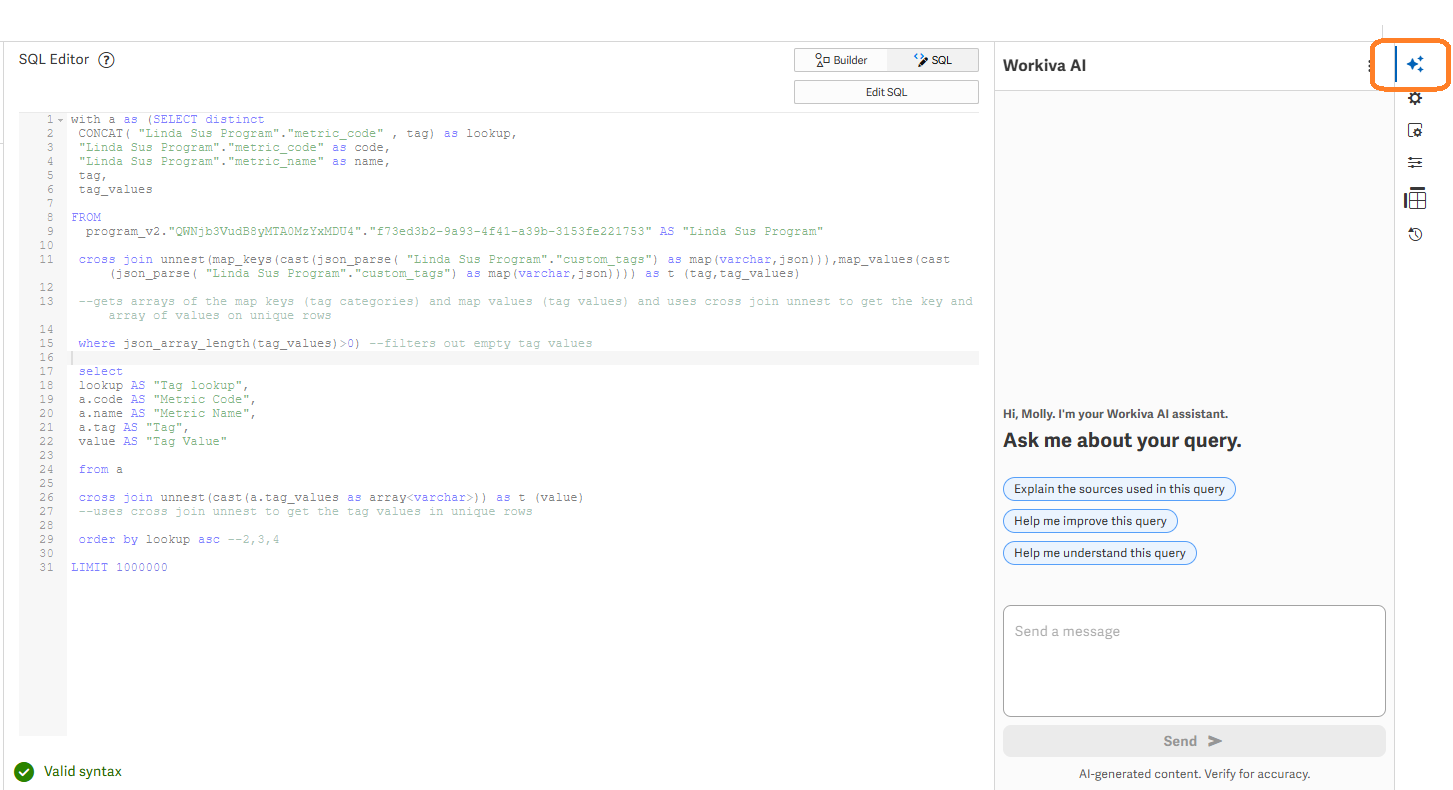
9. Summarize Large Wdata Data Sets
Use when: You need to brief leadership quickly.
Prompt:
Analyze this query and provide a one-page executive summary. Highlight major trends, significant changes, key risks, and the three most important takeaways.
10. Write Wdata Queries
Use when: You know what insight you need but aren't sure how to build the query.
Prompt:
I have a Wdata table containing facility, reporting year, emissions source, activity data, and CO₂e emissions. Create a query that returns year-over-year emissions changes by facility and identifies facilities with increases greater than 10%.
Additional examples:
Create a query that returns the top 20 suppliers by Scope 3 emissions.
Create a query that calculates emissions intensity by business unit.
Create a query that identifies missing reporting periods.
Create a query that compares actual performance against reduction targets.
BONUS tip:
Display "TBD" in your report when a Factbook metric value has not yet been entered. This is a helpful way to create report placeholders while data collection is still in progress. Simply copy and paste the formula below into your metric value column.
=IFNA(INDEX('Data Output'!$A$1:$X,MATCH((
CONCATENATE(F$3,$A6,$B6)),' Data Output'!$A:$A,0),MATCH("Value" ,'Data Output'!$A$1:$X$1,0)),"TBD")
Want to dive deeper?
Shape the Future
Do you want to be part of our innovation and test new AI and Sustainability features? Our Early Adopter Program is seeking your voice! Sign the Preview Feature Agreement to be ready for future programs.
Looking Beyond Sustainability Reporting?
Workiva AI extends across your entire organization to unite Financial, Risk, and Sustainability workflows. Know someone on your Financial Reporting or GRC teams? Tag them within the post or share the links below, so they can check out real-world workflows and plug-and-play prompts tailored just for them!
Level Up Your Financial Reporting with Workiva AI
Welcome to AI-Powered Workiva GRC
Your Turn
Share your favorite sustainability AI prompt below. The more examples we share as a community, the faster we can move from collecting sustainability data to creating value from it.
U moet u aanmelden om een opmerking te plaatsen.
Opmerkingen
0 opmerkingen