Setting up a workflow/process on worksheets
BeantwoordWe are trying to build out a specific workflow for preparing and signing off on schedules within workiva, but want to be able to limit access to preparers. I'd like to connect with someone in the Workiva team who can show me the "correct" way to start this process and set it up to be a part of an easy to digest dashboard. Who would I reach out to in order to help walk me through setting something like that up?
-

I'm not with Workiva, but when I read the above, curious if you are meaning "schedules" to be the same as a sheet within Workiva Workbooks. If that is the case, have you tried the Tasks functionality within Processes? You can assign tasks to a particular workbook, to a particular sheet and assign it to a preparer and then a separate approver with due dates, etc...
Only drawback to Tasks is you cannot comment within a task or add attachments, etc... That is something I think Workiva should move up in their development backlog so we can truly use Workiva for both completing an SEC filing and also use it to manage the procurement of support for such.
1
Hi William Meek!
Great question and some great insight from Pat Flanakin as well, thanks Pat!
In terms of resources, you're Customer Success Manager would be a great person to discuss this with! They'll be able to set up a meeting and discuss workflow options for your specific workspace and use case.
0
Pat Flanakin - Essentially what I am trying to do is build out a workflow process that is dashboard driven. Example:
Footnote Prepared via Spreadsheets in Workiva -> Sent to reviewer -> Sent to (published to) K/QI want my preparers to be able to edit the spreadsheets, but not be able to publish to the files. I want to drive what gets published based on when it's finished with review(s.) Does that sound like what you are envisioning here?
0
Yeah I see what you're after and unfortunately, unless there is workaround functionality available within WDesk, I don't think this is currently possible, directly.
Tasks aren't directly connected to permissions, etc... in the section of a workbook or document the task is tagged to; they more function as a "check the box" or a "paper trail."
I believe if someone has edit permissions to a particular sheet, they can also publish their changes from that sheet if linked to a document. The only options on this appear to be that you can limit their publishing to only their changes.
Now, indirectly, you may have a workaround using the following:
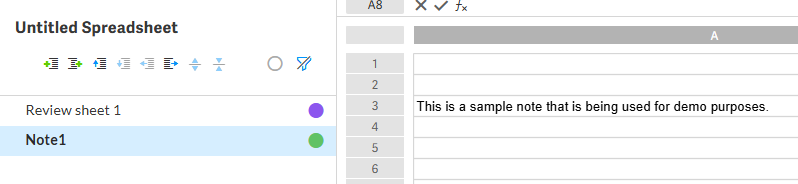
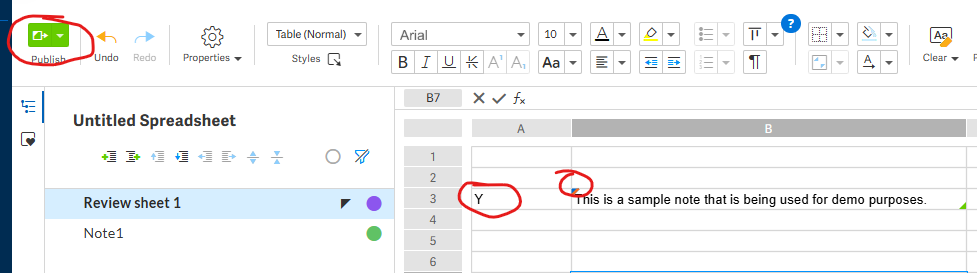
1) On the sheet where the footnote editing takes place, you allow edit permission for the preparer. In the example worksheet below, this is Note1. This sheet would use a color label, say yellow, for "in process", then the preparer would change it to green, which could drive an automation to notify you when it is changed to green.2) The above would be linked to a "Review" sheet (this is Review sheet 1 below) that populates a cell with the footnote language, only when another cell has "Y" in it, which would indicate your review status of the language. The preparer could have view access only to that sheet and since they cannot edit that review sheet, they would not be able publish the change to the document.
This is only a suggestion, but it provides a core idea that can be extrapolated as needed based on what works best for you.
In our case for our purposes, we only allow certain folks to make edits to the document / workbook that we trust and we also limit what cells they can edit, etc... We also have a validation sheet in the workbook that tells us, based on validation formulas, if there is an error or information we are still missing to complete the document that is deemed critical to drafting.

 1
1
I see this says "Answered." Was the above helpful William Meek?
0
Pat Flanakin - Still working through how we could set this up, but yes this was indeed a very helpful answer. I'm also talking to Workiva direct about how they envision this "should" be set up.
0
Understood....interested to know what Workiva says if it is convenient to share here when you resolve.
0U moet u aanmelden om een opmerking te plaatsen.
Opmerkingen
7 opmerkingen