SEC Viewer
BeantwoordWhen I look in the SEC viewer, my cover page and level 1 tags are showing up under a "Reports" heading? I've checked all of my cover page tags and they are all DEI tags except for the one member. What is causing this and how do I get them to have the correct label in the SEC viewer?
-

Hi Lori Van Straten,
It's possible the XBRL Outline sub-section for the cover page is set to Tagging Level 1 instead of Tagging Level 0. You can check this by right clicking on the sub-section name in the XBRL Outline and selecting "Edit Sub-Section". The tagging level for the cover page should be set to Level 0.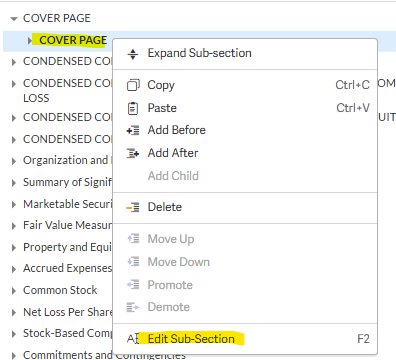
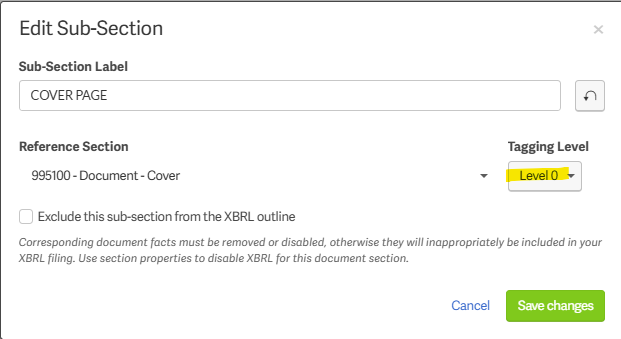 0
0
Thanks. I double checked and my cover page is set to 0 and all of my level 1 sections are set to level 1.
0
Thanks for checking Lori Van Straten,
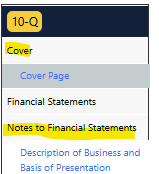
Do you have the correct taxonomy reference section? I'm not certain, but it may also be a difference in the label headings in our SEC Viewer and the one on the SEC website. I have a previous account who already filed which had two "Report" headings in our SEC Viewer, but the live filing had a heading for "Cover" and "Notes to Financial Statements."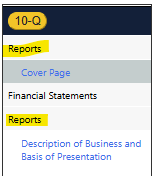
 0
0
I think you are right that it is a difference between the Workiva SEC viewer and the one on the actual SEC website. I checked a few of our 10-Qs and 10-Ks and they all have the same issue in Workiva, but look fine on the SEC website. I am going to assume this one will file fine as well. Thank you for your help!
0
You got it Lori Van Straten , let us know if you have any other questions!
0U moet u aanmelden om een opmerking te plaatsen.
Opmerkingen
5 opmerkingen