Important Taxonomy Migration Information for 2026 US GAAP Taxonomy
For the 2026 US GAAP Taxonomy release, FASB restructured the modeling of location dimensions and replaced them with new qualified name (QName) typed dimensions axes to improve consistency in financial disaggregation.
The QName typed dimensions restrict member values to represent the precise concept tied directly to financial statement elements. Instead of selecting from predefined member lists, preparers use members that better align with the current reported financial data located in the face statements, improving consistency in how structured data is interpreted.
New QName Typed Dimension Axes include:
- Location, Statement of Financial Position, Activity, Accrual [Axis]
- Location, Statement of Financial Position, Activity, Capitalization [Axis]
- Location, Statement of Financial Position, Balance [Axis]
- Location, Statement of Income, Balance [Axis]
- Location, Statement of Other Comprehensive Income, Balance [Axis]
FASB deprecated the legacy axes that were often misused or redundant, and the legacy axes will automatically migrate to the corresponding axes listed above. See the image below for an example of the migration log noting the action item will be required.
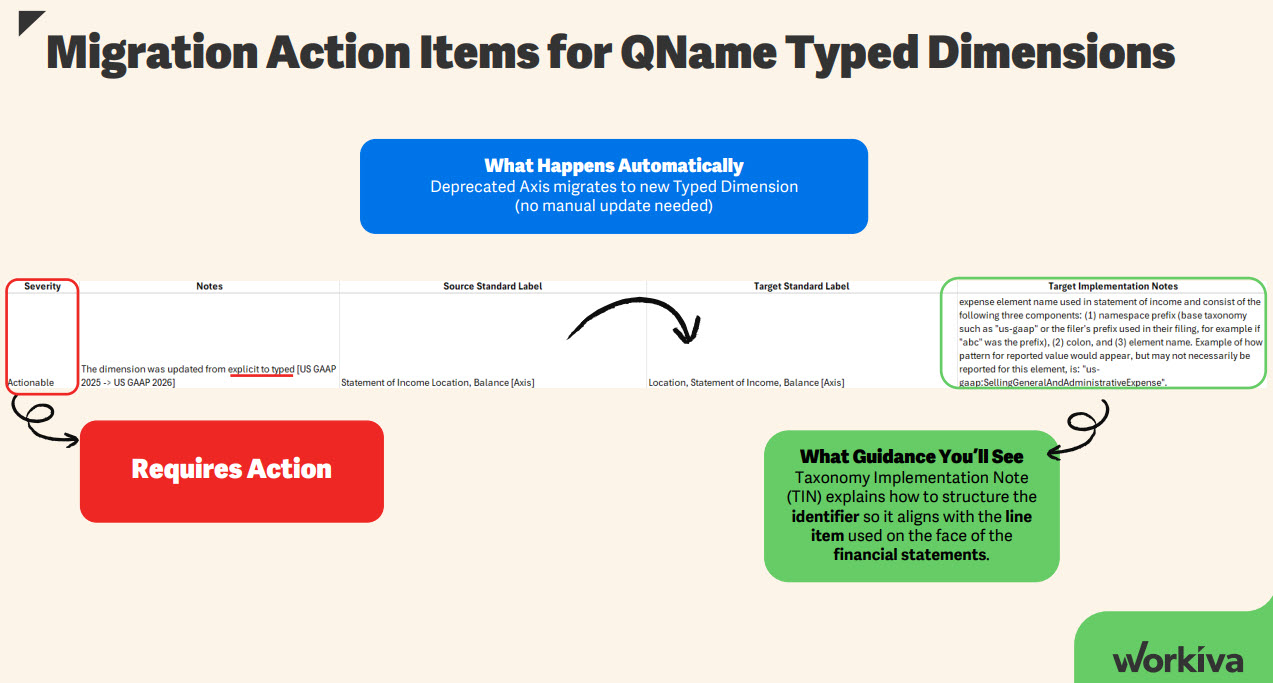
This action item indicates you will need to make a change in your XBRL filing to indicate the appropriate members to use for these new dimensions.
After you migrate, the Workiva platform will indicate a change is needed by generating XBRL validation messages as well as visual indicators that facts are not complete, as members are missing and need to be populated. See image below for an example:
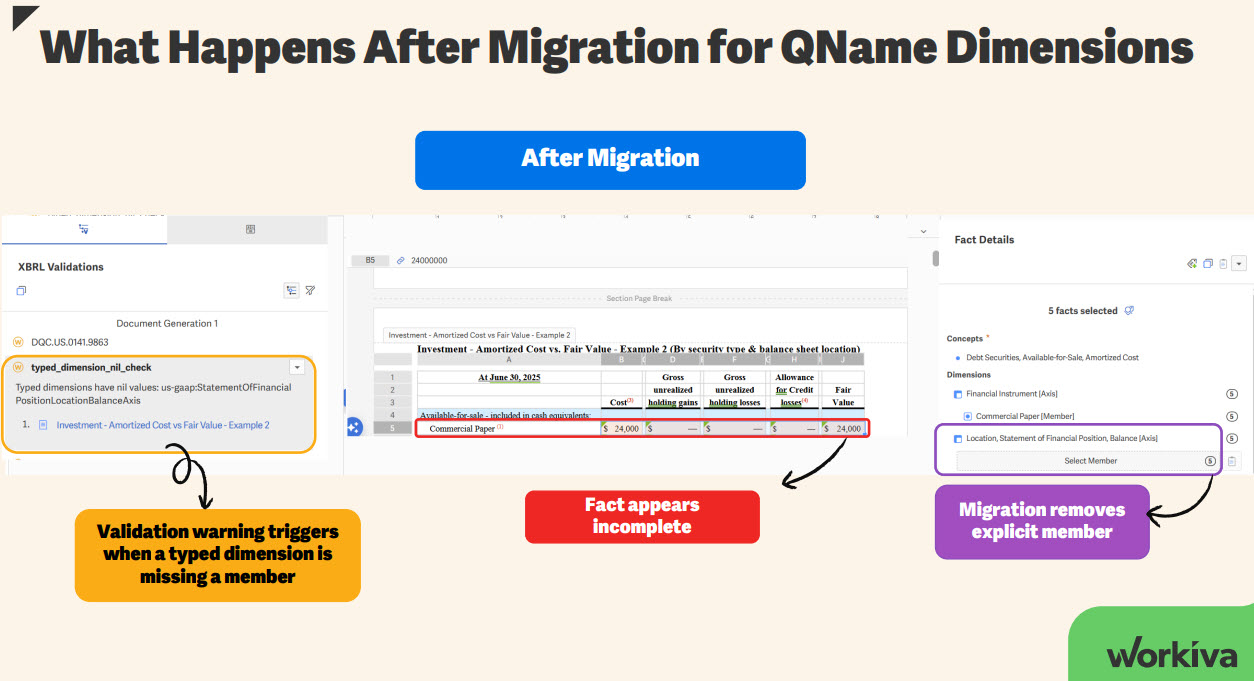
To replace the member, you can use the Drag & Drop feature from the XBRL Outline to use the same concept that is currently used in your face statements.
Drag & Drop Demo

We recommend using the Drag & Drop feature from the XBRL Outline to make sure that you apply the concept that is currently used in your document. You will still have the option to select the member using the Concept Selector window that will be automatically filtered for the appropriate type of concept to apply as the QName member.
Filers should evaluate their disclosures and update tagging to align with the new QName typed dimensions for financial statement location disaggregation.
We are here to help
If you want to learn more about the taxonomy changes specific to US GAAP 2026, you can click here to register to attend our annual webinar for 2026 US GAAP Taxonomy Updates and earn 1 CPE credit.
When migrating to a new taxonomy, you can also check out this help article on Deprecated Elements and Suggestions to assist you with the process.
Should you need help with migrating to the latest taxonomy, the Workiva Professional Services team is available for any of your tagging needs. Please don't hesitate to reach out to your Account Rep, CSM or PSM.
-
Officiële opmerking

Hello Lauren, thank you for reaching out. Regarding QName typed dimensions, they do not require a domain in the taxonomy or the outline because they rely on a specific data type to validate member inputs. This differs from explicit dimensions, which are well-known for requiring a domain to define the list of expected members. The presentation in the outline will only include the Typed dimension axis name as required for the proper taxonomy structure. You can keep an eye on the FASB implementation guide for Financial Statement Location Dimensions, which will include more information from FASB related to these typed dimensions. This is expected to be updated for the 2026 taxonomy soon.

Are there domains for this for the outline?
0
Thanks for sharing with us
0
Hello. When generating XBRL after using this method, I'm given errors telling me that my facts are not dimensionally valid. I get the "Axis and member or line item missing from or misplaced in outline" error.
I've confirmed that the concept element and the other axes and members are correctly placed, but the element it seems to have trouble with is the new Typed Dimension Axis that is has moved us to. I've placed the appropriate concept element from the relevant financial statement as the member for the axis, but I am still getting this error.
I have tried adding the member concept as a child of the axis, and that does remove the error, but it creates a new error which is the "Invalid child in table" error.
At this point, I'm not sure how to create an error-free generation with these new elements.
0
Alexander - I had numerous errors in our derivative footnote this quarter around this change and after much trial and error it's finally clean with no errors. Under our derivative table details, I have the abstract, table and then a two different axis/domain/members (derivative instrument, hedging designation) and then below that I put the 'Location, Statement of Financial Position, Balance (Axis)' but nothing after it - no domain or member like the other axes. You won't see the balance sheet account listed in your outline but it will show up in the SEC Viewer. I finally had success when I deleted this whole section from the outline and re-added it.
0
Lauren - After some discussion, what ended up working for us was to segregate any facts with these axes into their own section in the outline. So everything for Balance Sheet Location had its own section, separate of any that had Income Statement Location.
0
Yes, Alexander, that is the correct approach. An important nuance around Typed Dimensions, you can only have one Typed Dimension per XBRL Outline section. We recommend creating a separate outline section for each disclosure that needs a Typed Dimension.
0U moet u aanmelden om een opmerking te plaatsen.
Opmerkingen
7 opmerkingen