Understanding Chain Outputs
When building Chains, you might need to call another Chain, often referred to as a child Chain, from within your main Chain, also known as the parent Chain. This is done using the Run Chain event. If you’re not familiar with that process, take a look at the guide Run a chain within another chain.
A common challenge arises when you want the child Chain to send information back to the parent Chain. For example, the child Chain might generate a file or return a status, or perform a calculation. The parent Chain may need that result in order to continue. This is where Chain Outputs become essential.
What Are Chain Outputs?
Chain Outputs allow you to pass data from a child Chain back to the parent Chain. You can think of them as a way for the child Chain to report back with results. Once the child Chain finishes its task, its specific value or result can be available to the parent Chain to use in its next steps.
How to Set Up Chain Outputs
Follow these steps to configure Chain Outputs:
- Open the child Chain
- Click Settings in the top right Corner
- Navigate to the Chain Outputs tab
- Click Add Chain Output button
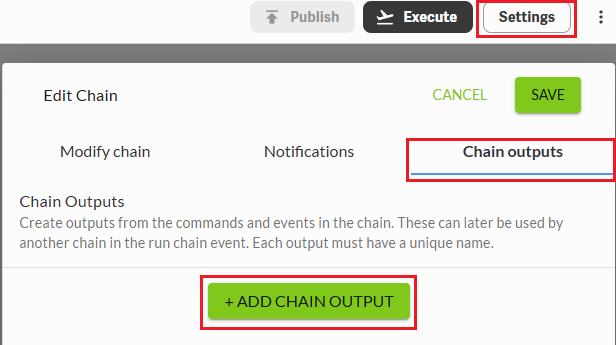
For each output you create:
- Provide a unique name. No special characters or spaces can be used
- Select the Command or Event that produces the result you want available to the parent Chain
- Choose the specific output from that Command or Event
Repeat this process for every result you want available to the parent Chain from the child Chain.
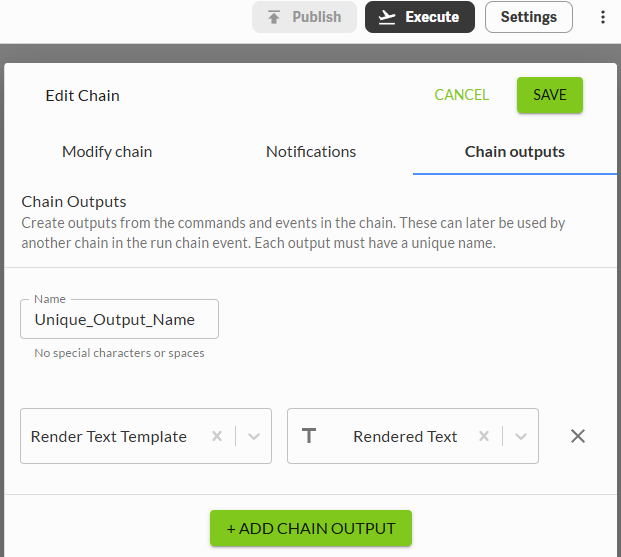
Using Outputs in the Parent Chain
Once your child Chain is configured with one or more outputs, here is how to use them in the parent Chain:
- In the parent Chain, open the Command that appears after the Run Chain Event and where the child Chain output will be used
- From the Variables panel on the left, expand the Run Chain Event
- You will now see the output(s) you defined in the child Chain
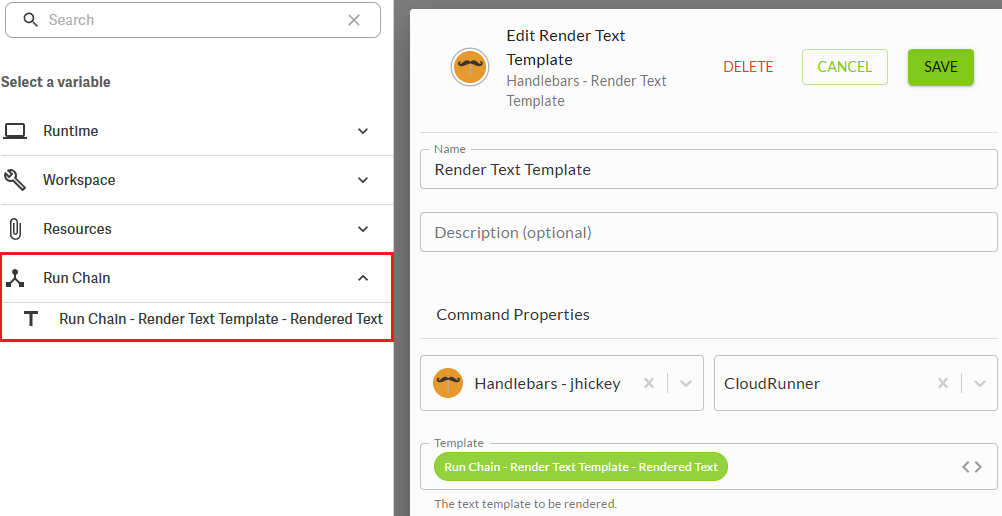
Using Chain Outputs makes your Chains more flexible and efficient. It allows you to build modular Chains that communicate with each other and adapt based on real time results.
U moet u aanmelden om een opmerking te plaatsen.
Opmerkingen
0 opmerkingen