Rounding Down Whole Numbers
We have all numbers in our ESG Factbook in the fullest precision, but we need to round up or down as needed for our ESG disclosures. I understand how to display the numbers rounded up, but cannot figure out how to get them to display rounded down. For instance, we need to display the number 4,551,754 as "more than 4.5M" however I cannot find a way to round it down so that it displays this 4.5M instead of 4.6M. Currently we are showing it as "4.6M (stated as 4.5M)" but we cannot publish it that way, so we have to break the links. Do you have a suggestion for this scenario as we have a lot of ESG numbers like this. Please help ~ Thanks!
-

Hi Linda Walter,
It depends... Is the data your working with in the ESG experience? or Is this in the spreadsheets experience?0
I think both, but not sure on the terminology. The data flows from the ESG program to our Factbook spreadsheet (via formulas), then we publish the Factbook sheet to the SEC module and they use the data for the 10-K and Proxy.
0
Hi Linda Walter!
If you're still searching for a solution here, my team uses the formula, "=ROUNDDOWN([cell], [number of rounding digits]) within the Factbook and links to our ESG disclosures using the rounded number.
This allows you to review the received data submission while formatting the number to align with the preferred "more than..." language in your Report and allows you to maintain a Factbook link!
I'm actively searching for ways to automate this within Workiva, but this is the solution my team has used in year's past.
0
Hi Lauren,
Thanks for your message! I can typically use the great value formatting functionality within Workiva to show numbers rounded down, but I don't believe there is a way to round a number like 88,300 down to display it as >85,000, as that does not follow normal rounding rules. I am able to use the ROUNDDOWN fuction with some additional math, but from the research I've done, it seems like the FLOOR function would do what I need, but Workiva does not have this function.
The way we have worked around this issue is to add an additional column to our Factbook. We now have a column for the original number in full precision and another column for linking to reports. For most metrics, we just use the Workiva formatting features in the linking column, but when we have to manually manipulate the number (e.g. 88,300 to 85,000), we either overwrite the formula for pulling the number from the program and hard code it as the number to display or use that ROUNDDOWN function. We then highlight the cell so it stands out so we are sure to see that we hardcoded the cell or used the rounding technique when we roll forward the program. This way we can see both the original number and the linking number in the factbook.
I've attached an example of a few metrics, showing how we highlight the hardcoded or ROUNDDOWN formula ones in a bright blue color. I just thought I'd share how we have worked around this in case it helps you.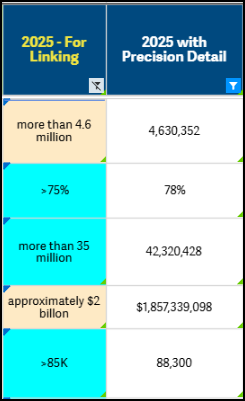 0
0U moet u aanmelden om een opmerking te plaatsen.
Opmerkingen
4 opmerkingen