Merge source link
CompletatoI'm trying to streamline the primary date inputs and there are two cells with the same information (e.g., they are showing the same year). Each of the cells is linked to different locations in various documents, presentations, and other spreadsheets. Short of relinking everything to the one I want to keep, is there a way to somehow merge the sources so the cell I want to keep somehow keeps all the links it has but also inherits the other source cell's links? Cut and paste doesn't work because some overlap error comes up (and I wouldn't want to lose the links of the source cell that I'm pasting over anyway). Please let me know if there's a workaround you might be able to suggest.
Thanks,
--jhoanne
-
Commento ufficiale

Great news! Merging source links is now possible in Workiva.
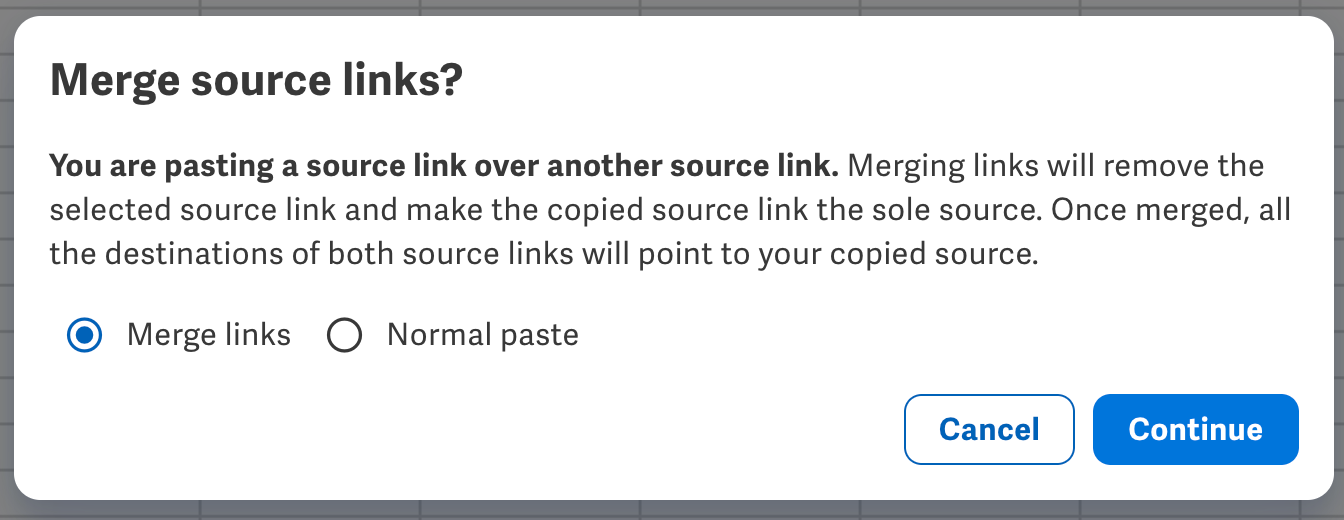
Thanks for patience on this one. Let us know if you have any follow-ups or require any additional info. Cheers and happy linking!

Hi Jhoanne,
Unfortunately there is not a current ability to merge sources at this time. I will create an idea ticket and send it to our product team for further investigation. Please let me know if you have any questions!
Thank you!
0
I'm looking for this functionality as well - it'd be very beneficial.
0
any update on this feature?
0
Hi Daniel Kiss,
Sadly, there no update at this time. The feature remains proposed to our product team and we'll continue to update users of any progress here!
0
Going to submit separate feedback on this. This has the potential to create major problems due to the default being "Merge links."
0
I think there should be a tutorial about how this works and the potential pitfalls if you accidentally merge links when you didn't mean to due to the current default choice in the above dialogue box is to Merge Source Links. Given this is a new functionality and can change how prior documents are sourced when pasting linked cells in a workbook from an older workbook to a new workbook, it has the potential to change, if I'm understanding the functionality correctly, prior completed documents that have links to the old workbook, but now if merged, are linked to the new workbook. I consider this very precarious.
I am appealing to our Workiva support team at this time to change the default to Normal Paste, or even better, to embed the functionality within the current paste link options where you can select an option, then also change the default paste operation for a current work session.
Or, maybe I'm an outlier and the only one that sees this as I have described above. Could be the case....
0
Hi Pat!
Thanks for this feedback. Thanks for bringing this up. Indeed, that was unforeseen at the time but we agree it’s less than ideal.
We are working on updating the default behavior to “Normal paste” to provide a better overall experience. The product folks are actively working on this change and we anticipate rolling it out soon. We’ll be sure to keep this post informed on progress and let you know once its live.
In the meantime, give us a holler if you have any follow-ups. Cheers!
0
Just released to Workiva, by default the option when pasting over a source link for merging is now set to "Normal paste".
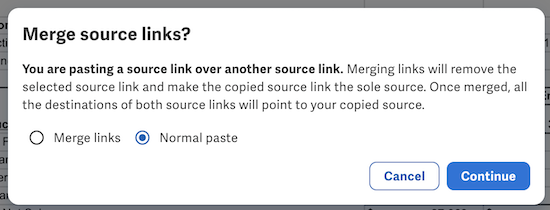
Thanks again for bringing this to our attention. Do let us know if you have any follow-ups and have a great day!
0
Thank you Mike. I confirm it works as you have described above.
0Accedi per aggiungere un commento.
Commenti
10 commenti