Date functions (TEXT(MONTH())) and TODAY()
We have encountered with few use cases:
1)Function Text + Month is not working as expected, as per below I would expect to receive value as "DEC", however final result is "Jan". Tried to modify MONTH value bus the outcome still the same "Jan"
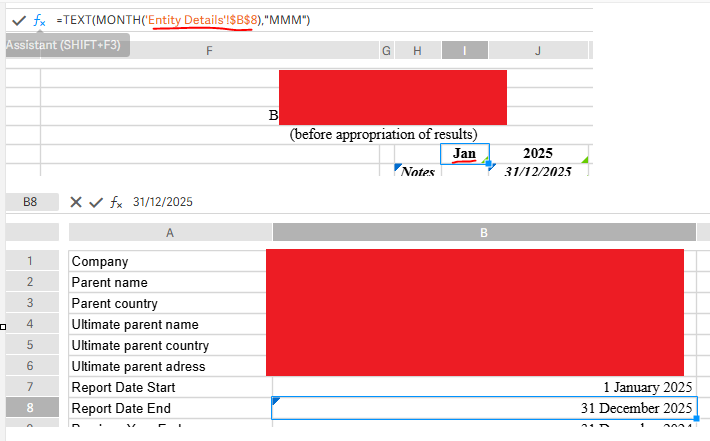
2) Is there any timeline when Workiva will have TODAY() function?
0
-

Hi there Lukas Rakickas,
I don't believe you need the "MONTH". I'd recommend using the following:
=TEXT('Entity Details'!$B$8, "MMM")- If you want it all caps (DEC), wrap it in UPPER:
=UPPER(TEXT('Entity Details'!$B$8, "MMM")). - If you want "December," use four Ms:
"MMMM". - Ensure the source cell (
B8) is actually formatted as a Date in the Formats panel. If B8 is just "Text" that looks like a date, theTEXT()function might return an error.
Let me know if this works for you or if you run into any issues!
In regards to the TODAY formula, we introduced a lot of new formulas/functions in 2026. Unfortunately, the TODAY formula is not currently on our near-term roadmap. We do have a feature request in place that I can absolutely add you to. Should the TODAY formula be picked up for work, we would send an automatic update letting you know!0Vous devez vous connecter pour laisser un commentaire.
- If you want it all caps (DEC), wrap it in UPPER:
Commentaires
1 commentaire