How to adjust the header to look the same in the whole doc?
RéponduI've been trying to fix the header (it is a table) to have the same size and look in all the pages, but I have not been able to do it even though all the header properties and section properties looks the same. See image below: I would like that the left part looks align with the right side.

-

Welcome to the community, Eilyn!
Thanks for the questions. Here's some steps to try:
1. Adjust Header Margins: By adjusting the 'From Top' margin within the Header Properties, you can control the spacing size for your header text. This setting will only adjust the distance of the text within the header area.
2. Set Table Properties: Ensure that your table properties, especially for header rows, are set uniformly. You can access the Table Properties tab to manage how headers appear across multiple pages. Set one or more rows as headers so they repeat across page breaks.
3. Clear and Reapply Formatting: If you encounter issues with table cell formatting not being retained, consider using the "Clear" function to remove existing formatting and then reapply the desired font style, size, and alignment.
Let me know if these do not help or I've missed the mark and you have some follow-ups. Thanks again and have a super day!
0
Hi Mike, thank you for your help.
I've followed your steps, but none of the 3 resolved the issue. Would the issue be related with the sections? see the image where the margins and from top have the same parameters, the rest of the doc has the same, but it is just only one page that is off on the top margin as shown in the image I sent in my first inquiry.
1rs page:
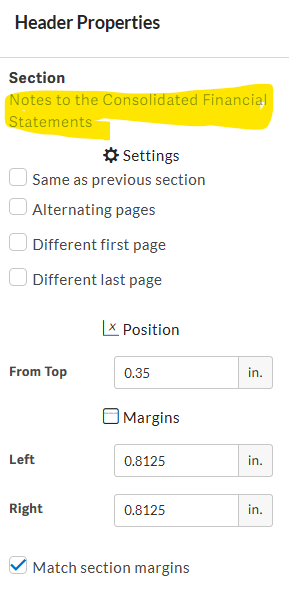
2nd page:
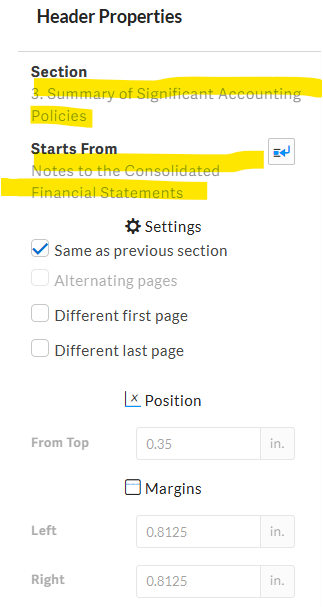 0
0
Hi Eilyn!
Thanks for sharing those settings. Off hand I'd not expect those to impact how the formatting appears. Within the cell that is being troublesome, are there any non-printing items forcing it to not align the same? If you toggled this on, it will show what is in the cells. This is found in your ribbon, next to the text angle and character spacing.

Let me know if you see anything amiss in there or have follow-ups. Happy to keep digging!
0Vous devez vous connecter pour laisser un commentaire.
Commentaires
3 commentaires