Fill Series bug?
So I happened upon the Fill Series feature trying to use an Excel hotkey command using the Ctrl + D keys. Below is a screenshot example. In excel, if I highlight all of the cells below the "1" which has a formula referencing L19 and hit Ctrl + D, it would bring that same formula down. In Wdesk this popped out what seems to be the "Fill Series" feature which must work similar but with multiple options, which is kind of nice. However, if I do this using Ctrl + D and click an option like "Fill Series" it will not work and instead triggers "Undo" and undoes whatever my last edit was.
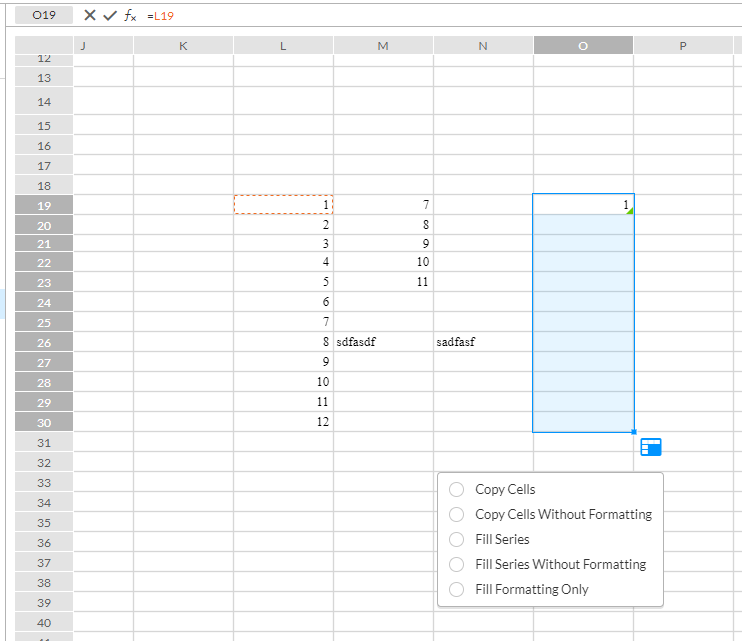
I was just searching the community posts to see what this feature is actually for and found an explanation that shows you have to use the feature by grabbing the corner and pulling over (which also works in excel). I've been able to successfully test this method now in some test cases. However, even now knowing how it works with the pull across trigger, I still get the undo error when I try and only use the Ctrl + D hotkeys and select an option.
-

Hi Dallas!
Thank you for letting us know about the fill series possible bug. I too tested this out and experienced the same outcome. We have submitted a ticket for this bug and will resolve it as soon as possible.
0Vous devez vous connecter pour laisser un commentaire.
Commentaires
1 commentaire