Blacklines Between Documents
TerminéeWe need a good way to run blacklines between documents that are not available in the history. For example, we provide our Board a blackline of Q2 current year to Q2 of the prior year. The only way for us currently to run a blackline is to download the documents to word and then run a blackline. Unfortunately, the word document truncates some of the numbers, words, etc.
-

Hi Johanne!
Currently, yes, this is available as a beta option. If you'd like to enable this setting, let me know and I can get that going for you.
The feature to make this generally available is planned for release in Q2 2021. I should have a better idea soon enough of a more precise timeline but there's pretty good confidence on making it available next quarter.
Thanks for reaching out and do let me know what questions you have. Cheers!
0
Hi Mike! Yes, please enable that setting for us. Thank you for your quick response!
0
You are very welcome :) Sit tight and we'll get the ball rolling
0
Hi Mike - just saw this thread and would love to get this enabled on my end as well if possible. Thanks
0
Hi Brian,
For sure! I just drummed up a request for you and we'll be in touch there. Thanks for reaching and chat soon!
0
Mike,
I just found this thread and would love to get this enable on my end as soon as possible. Thanks !
0
Sounds like a plan, Paulina! Let me get my magic started. We'll be in touch.
0
wow, thanks for the quick response Mike. I appreciate the help
0
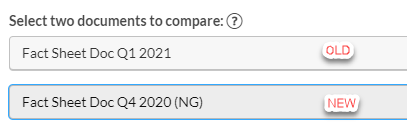
A suggestion on improving the the blacklines between projects would be to reverse the order of the two documents. In the current document if I do a blackline on a newer draft compared to an older draft, the newer draft is listed on top.
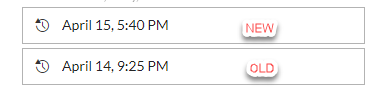
In the blackline between projects the first document I select is the old, listed on top and the second is the new in the blackline, listed on the bottom. They are backwards, so I always have to run it twice because I'm used to seeing it the other way.
 0
0
Hi Mike - Can you please help enable this feature for my account as well? Thank you.
0
Hi Mark!
Can do. I'll be in touch momentarily on next steps. Thanks for reaching out!
0
Mike Davis It sounded like this feature was planned for Q2 2021, but I haven't heard any news on it so I'm guessing it is still being worked on. Any update on where this stands? I have some projects that this would be helpful with, but we have a few months before we start actively working on them.
0
Robert Fecher you are correct, initially it was planned for Q2 2021 but it has been moved back a bit and is now a priority for Q3 2021. We do have a beta available today, so let me know if you'd be interested there, or if you have any questions for me.
0
Hi Mike, can you please enable the beta setting for blacklines for me as well?
Thanks,
Tammy
0
Hi Mike Davis, will you please have this enabled on my account, too? Thanks!
0
You betcha Jennifer Bartlett!
0
Hi Mike Davis, may we request for this feature to be enabled in our company's Workiva users as well? Many thanks.
0
Mike Davis Any idea when the official release will be? If there aren't solid plans to release in the next month, can you enable the beta feature on our account as well?
0
Hi Robert Fecher as of right now this enhancement is planned for Q4 2021. I would not anticipate it being here in the next month. I'm happy to get this request going for you to enable this setting. We'll be in touch soon!
0
Hi Mike Davis - Can I get this enabled on my account? Thank you!
0
You betcha jho!
0
Hi there, any update on rolling out this feature before year-end or soon after? I'd like to try it out! Thanks!
0
Hi Dale!
Thanks for reaching out. As far as general availability of this feature, I'd not anticipate it before the end of 2021 and is more likely to be within Q1 2022. That being said, I am happy to get the beta enabled for you. Let me know if you'd like to test it out and I'll get the ball rolling there.
0
Hi Mike, could you enable the beta version of this feature for my account?
0
Hi Chris!
For sure. I'll get crackin' on this ASAP. 😊
1
Hi Mike, could you please enable the beta version on my account please?
0
You betcha, Sarah!
0
Hi Mike, can you enable this on my account please?
0
Supposedly this was added to my account but I don't see it. I reached out about how to use it and run the report and have had NO response.
0
For sure, Krystle. Will do!
Dale Karasek - snap, I am seeing your ticket on the backend. I apologize I didn't read it correctly. I'll get the request sent over to you ASAP.
0Vous devez vous connecter pour laisser un commentaire.
Commentaires
78 commentaires