Em dash for true zero; 0 for rounded figures
Does anybody have any tips (custom formatting or otherwise) that would allow for true zeroes to be shown as dash ("-") but figures rounded to zero (ie. $499,000 shown in Millions, 0 decimals) shown as "0". I am trying to avoid adding a separate column, formulas, etc. but open to all suggestions.
-

Hi there DJ Berry,
Happy to chime in on my initial thoughts here but I encourage any other customers to share as well!
To achieve the desired formatting where true zeroes are displayed as a dash ("-") and figures rounded to zero are shown as "0", you can use the following tips and workarounds:1. Value Formatting Panel:
- Use the "Value Formatting" panel in Workiva to adjust how zeros are displayed. For values formatted as Number, Accounting, Currency, or Percent, you can enable the "Use alternate display for zeros" option. This allows you to display zeros as an em dash, en dash, hyphen, or blank. 2. Advanced Formatting Options:
- In the advanced formatting settings, you can manually configure the display format for zeros. For example, you can set the display for true zeroes to a dash while ensuring rounded figures are displayed as "0" . 3. Conditional Formatting:
- Apply conditional formatting rules to differentiate between true zeroes and rounded figures. For instance:
- Set a rule to display a dash for cells with a value of exactly 0.
- Set another rule to display "0" for cells with rounded values . Most of this information is in our Format values and numbers help article if you're looking for further details!0
Hi Isabel,
Working with DJ on this one! Unfortunately, that doesn't quite answer what we're after. The issue is that when put numbers into "accounting" format, the presented value of the cell will default to an em-dash even though the value isn't truly 0. If a number rounds down to zero, it will still present as an em-dash. We're finding this to be a problem when it comes to financial reporting as it misrepresents the balance (e.g., for reporting in millions, a $490,000 adjustment would present as - rather than 0), resulting in a tedious manual search to see if any of these misrepresentations exist in the filings.
Perhaps this is not a setting that is available in Workiva yet. If you have any ideas, please let us know! Appreciate your help thus far.
0
To: DJ Berry and Allyson Vanek
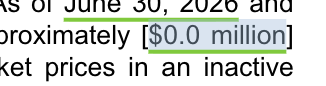
Hi, may I confirm, if you don't mind, if you are addressing within a report (such as a 10-Q/K, etc...) in the narrative of a disclosure, vs a table. If a narrative, below I have an example of our format when we have an amount such as $49,000 which rounds to zero for our purposes based on our preferred presentation format.
In the case below, are you asking to be able to show just a "0"? Or are you wanting to show like I have shown with the currency symbol and the decimals (if applicable) and the "shown in" denomination of thousands, millions, etc....?
From what I'm reading from Allyson's additional details above, sounds like you want to be able to just show a "0" with nothing else. If this is the case, I take it your issue is that you want this to be applied to all numbers so you don't have to address on a one-off basis when amounts round to zero.
Additionally, do you want this to be the case as well for any amounts rounding to zero within tables?
Do you mind clarifying?
 0
0Iniciar sesión para dejar un comentario.
Comentarios
3 comentarios