Connection refresh for queries with parameters not giving prompt for parameter while refreshing
RespondidaWhenever I try to refresh a connection in wdesk for a query with multi-select parameters, I expect to get a prompt to select the parameter value. It turns out that's not the case.
Do we have to delete the connection and create it again every time we want to change the parameter value?
-

Hi Krishma,
Thanks for reaching out! If you click the card for the connector it should expand and you can change the parameter value, before clicking the refresh button. Please let me know if you have any other questions!
Thanks!
0
Hi Paige,
I tried the above. Our connections keep failing with "unexpected server error" whenever we try to update the parameter or refresh after adding a new field/table in the underlying query. We have to repeatedly delete connection and create a new one until one works successfully.
Have you come across such issues before? Is there any way to resolve or debug the issues? The way there are logs in chains.0
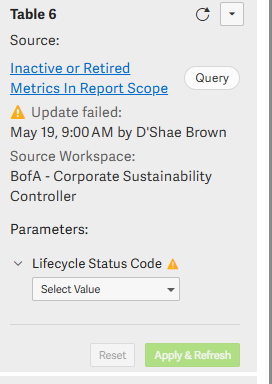
Running into a similar fail issue. We have connections running automatically through a Chain. For the queries we have selected parameters set to pull are failing each time the Chain runs because the parameter selection isn't being applied ongoing. This is causing automated processes to become manual by constantly replacing the connection. Is there a way to resolve? Will be submitting an issue ticket on this as well.
0
Hi D'Shae Brown, does the Query run successfully if you run it manually in Wdata using the same parameter value(s) the Chain is using? If the Query runs successfully in Wdata, can you please post the error message your receive in the Logs tab of the failed Chain node? Thanks
0
Yes, it does run successfully in Wdata. The Chain itself does not fail, the connection does within Wdesk when the chain has ran in the background.
0
 0
0
Hi D'Shae Brown. You may get more information on the error if you hover your mouse over the orange triangle in the failed connection. How many cells of data data does the query produce? It sounds like you might be hitting the Spreadsheet cell limit.
0Iniciar sesión para dejar un comentario.
Comentarios
7 comentarios