Continuous numbering in a table
Hello,
I try to have a numbered list continue from one cell to the next one but I don't seem to be able to select the 'Continue numbering from previous item'. The 'Restart numbering' functionality seems to be locked... Can anyone help me sort this out? Thanks!
-

Hi Nadine Legrand Thanks for reaching out! Do you know if you are using a style by chance? If so, you will want to make sure it is unlocked! Once that is confirmed, if you double click into the cell, open the properties right hand panel, & go to paragraph properties, you should have the ability to alter the list numbering! Please let me know if this works for you! 😊
 0
0
Hi Brooke,
Thank you for your swift reply.
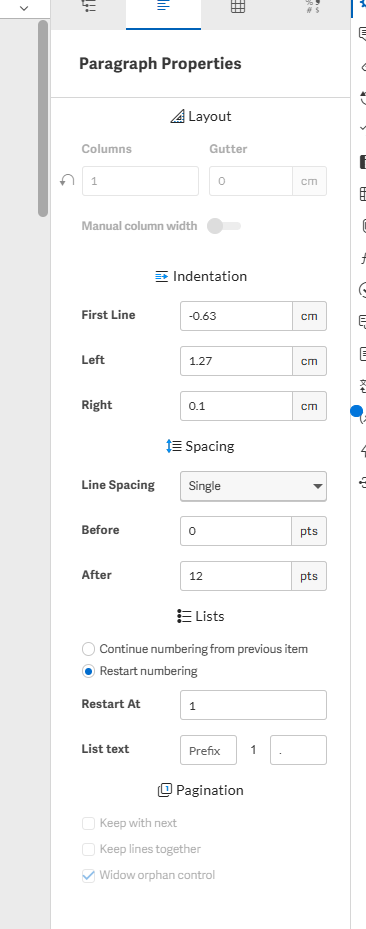
I checked in the style guide and the Table normal style does not seem to be locked (see screenshot below).
I do see the 'continue numbering from previous item' but if I try to select it, nothing happens the blue dot stays at 'Restart numbering'... and I don't understand why.Thanks again for your help and have a nice day.
Nadine

 0
0
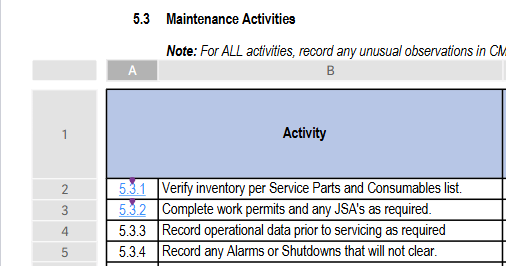
Nadine, did you have any luck fixing the numbering in your table? I'm having the same issue, it won't select continue from previous. I have changed the value formatting to number, but it will not continue.
 0
0
Hi Shelby,
No luck in fixing the issue. I can't select the 'continued numbering'.0Iniciar sesión para dejar un comentario.
Comentarios
4 comentarios