Inconsistent duplicate fact values
RespondidaI’m working on tagging my UK financials and have linked the registered office address from a spreadsheet into the Word file. I’ve inserted it in three locations and tagged it each time as “Address Line 1 of Registered Office.”
When I run validation, I get an error—though I’ve double-checked and the address appears consistent across all three instances. Since the tag is being accepted in each spot, I’m unsure what might be causing the issue.
Would appreciate any pointers you might have on what to look out for.
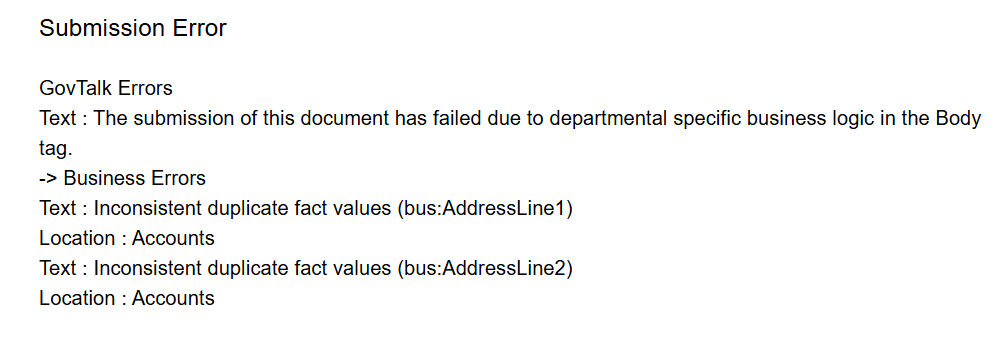
-

Hello and welcome to the community, Shikha!
We are happy to help here. Ultimately this is a duplicate fact message, meaning multiple different facts with same tagging. This can happen due to many little nuances that differentiate between any of those facts, such as formatting of the links, or an extra space selected for 1 of the links. If these error messages are not displaying in Workiva platform but are a surprise at the regulator then this would be an issue for our Customer Support team to look into. Is that the case for you?
An easy work around aside from investigating the consistency of the tagging and fact values at all locations is to chain link the dates and then only tag one of the dates as well, which would avoid creating multiple facts for the same value. Here's an article on chain linking. https://support.workiva.com/hc/en-us/articles/360035641432-Chain-link-with-iXBRL
Let me know if you have any follow-ups or need anything else. Thanks!
0
Hi Mike
Thank you for your response - The error message is not displaying on Workiva platform
I have used chained link however my address line 1 and address line 2 has a common word .could that be the reason of the error.
Thanks for you help
-1Iniciar sesión para dejar un comentario.
Comentarios
2 comentarios