SAP BDC to Workiva API pagination issue
I have an API chain pulling from SAP BDC. BDC sort of truncates the API call and at the end of the API call, it gives a skip token that then needs to be fed in to get the next page. This process continues on until you get to the last page where there is no skip token.
I am very new to chains (and really APIs in general). How would I go about creating a process that can grab skip token part of the API call to then cycle it back through until it gets to the end of the report?
Example of page end with skip token:
"@odata.nextLink": "SWA_RL_FIN_AM_WORKIVA_CONSOLIDATION(STARTDATE='01-2026',ENDDATE='07-2027')/Set?sap-language=EN&$skiptoken=5870"
No skip token:
}
]
}
Initial API call:
API call with skip token:
Any help would be amazing. Thanks!!
-

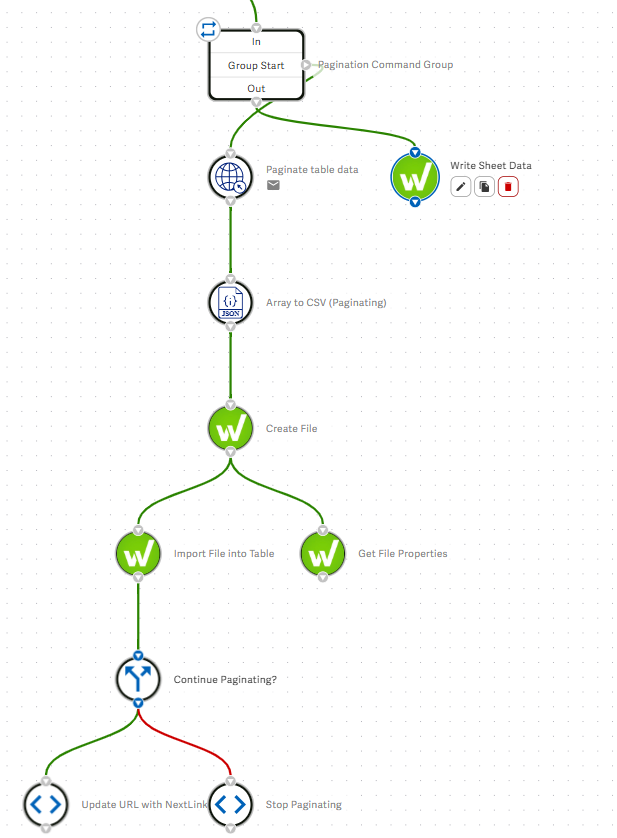
The way we solved this is with a command group that has this sequence of steps and runs so long as a dynamic variable called 'paginate' (whose value is defaulted to true earlier in the chain) remains true:
- The GET node - to call the API. Use a dynamic variable for the API URL (which can be set to the initial API endpoint value ahead of the command group).
- A JSON - Array to CSV node - to extract data from the response and transform it into a tabular format.
- A Workiva - Create File node - to store the transformed/tabular data as a file in a Wdata table (previously configured - you can do this in the chain or manually, depending on various factors).
- A Workiva - Import File into Table node - to actually import the file into the table.
- A Conditional node - this checks to see if there is an odata.nextLink response string in the response (from step #1). The easiest way to do this is paste a dummy version of the expected response in the 'Output Schema' section of the GET node, making sure it has the correct JSON structure (the values don't matter). Make sure it is a paginated response so that it includes the odata.nextLink key. Then, in the conditional node, you can add a check for a String, then for the value add the response (from step #1) and transform it via "Get Value from JSON" and select that odata.nextLink key. The condition we're using is "Is Not Blank" (although I think you could customise this depending on your needs).
- Based on the outcome of the conditional, either update the dynamic URL to be the URL value from the odata.nextLink key, in which case the loop will repeat and call that (next) URL in its next run---OR update the paginate value to be false, in which case the loop will exit. Then proceed with appropriate post-loop commands in your chain.
I'm not sure that's optimal; that's just the way we built it. I think you could do a number of different things in steps 3/4 as well, such as perhaps just updating a single CSV file and only attaching it to a table once all calls are completed [EDIT: looks like Stack Files Across Command Group Iterations – Support Center might be the best resource for how to do this 'right'], but this was the way we did it. I'm interested to see if someone else has a better approach---I thought maybe there was even a template chain from Workiva for this use case, but I didn't see one.
Here's a screenshot of that part of our chain for your reference. The 'Get File Properties' and the ultimate 'Write Sheet Data' chain are not essential but just included here since that's what our chain does.
 0
0Please sign in to leave a comment.
Comments
1 comment