Note: This feature is provided to select customers as part of the Program Activities preview. This preview and its associated features are provided through October 15, 2026. Workiva may extend the testing period of the preview features at its discretion. If your team is interested in testing this feature, please contact your Customer Success Manager.
To help track and review changes to metric values and tasks in Sustainability Program, you can export their activities to a comma-separated values (CSV) file. From the CSV file, you can view details about the activities — including who performed them, when, and where — for an audit trail of the Program.
Export activities
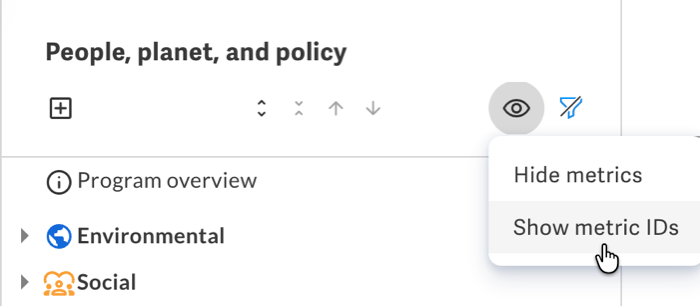
Tip: To include the metric ID as a prefix to metric names, select Show metric IDs from the Program outline before you export activities.
To download activities from Sustainability Program:
- Choose whether to export activities for a specific metric or topic, or from across the Program:
-
For activities within a specific metric or a topic's metrics, select the metric or topic in the outline, then select Export activities from its menu.
Note: If you export activities from a metric or topic, the CSV includes only activities within its values and tasks by default. To include other activities, adjust the filters as necessary.
- For activities within multiple metrics or other areas of the Program, select Program overview, then select Export activities from the menu.
-
-
Select the date range of the activities to export.
Note: Some activities have limited history available and may not include all changes from the Program's creation.
-
To include only activities within specific metrics, select them in Metrics.
Tip: To help find a metric, search for it by its name, ID, topic, or applied Program tags.
- Select the activities to export.
- To generate and download the CSV file, click Export.
Activities to export
The export CSV can include activities across the Program — from Program overview, or within topics or metrics.
| Activity | Description |
|---|---|
| Program created | The Sustainability Program was added to the workspace |
| Program updated | A detail of the Program — such as its name or settings — was edited |
| Topic created | A topic was added to the Program |
| Topic updated | A detail of a topic — such as its name — was edited |
| Topic deleted | A topic was deleted from the Program |
| Metric created | A metric was added to a topic |
| Metric updated | The details or configuration of a metric was edited |
| Metric deleted | A metric was deleted from the Program |
| Value created | A value was added to a metric |
| Value updated | The value was edited, such as during its setup or data collection |
| Value deleted | A value was deleted from its metric |
| Value status updated |
The status of a value changed, such as from Pending to Complete Note: If a task collects multiple values, the CSV includes a separate row for each value's status update. To help identify that the updates occur together, they share a common Activity ID. |
| Task created | A task was added to a metric |
| Task updated | The task was edited, such as to adjust its assigment or the values it collects |
| Task deleted | A task was deleted from its metric |
| Task status updated | The status of a task changed, such as from In progress to Complete |
Activity details
From the columns of the CSV file, you can view details about each activity.
| Column | Description |
|---|---|
| Item ID | The unique identifier of the affected metric value or task |
| Name | The name or description of the affected metric value or task |
| Type | The type of item affected, such as Value or Task |
| Activity | The type of activity performed, such as Updated |
| Applied to | The affected field within the metric value or task |
| Prior value | The entry within the affected field before the activity |
| New value | The updated entry within the affected field after the activity |
| Description | A summary of the activity performed |
| Performed by | The name of the workspace member who performed the activity |
| Performed by ID | The ID of the member who performed the activity |
| Timestamp UTC | When the activity occurred, in Coordinated Universal Time (UTC) |
| Timestamp local | When the activity occurred, based on your browser's time zone |
| More details | Additional context about the activity, such as an approver's notes when they approve or return a task |
| Activity ID |
The unique ID of the activity that performed the change Tip: Activities performed together — such as status updates to multiple values collected through the same task — share a common ID. |