Overview
Form 17-H is a confidential/non-public risk assessment report which larger broker-dealers are required to file on a quarterly and annual basis, pursuant to Exchange Act Rule 17h-2T. Broker-dealers with more than $1 billion in assets and $50 million in capital are covered under this requirement. Quarterly reports are submitted using EDGAR form type 17HQCON (and amended) and annual reports are filed using 17HACON (and amended). As of June 2025, these reports are required to be filed electronically using an XML structured data format and PDF or HTML exhibits, with a future requirement of certain iXBRL financial statement exhibits (to be determined).
Compliance Dates
17-H reports have traditionally filed on paper, however Final Rule 33-11342 mandates that all filers must submit these reports electronically via EDGAR as of June 30, 2025. A new iXBRL structured data requirement was originally scheduled for March 31, 2026, but this deadline was extended until March 31, 2027 in order for the SEC to finalize the taxonomy and requirements. Confirming copies of paper filings as well as amendments to such are supported.
Workiva’s Implementation
The 17-H reports consist of information about the broker-dealer, material associated persons (as defined by § 240.17h-1(a)(2)), and material persons not filing in the report (Part I), as well as XML structured data (Part II). Part I information is provided via the Filing Wizard and Part II data is collected via a specially formatted spreadsheet. In addition, several exhibits may be required depending on the reported data and report type, currently as PDF, HTML, or plain text formats - with an iXBRL mandate expected in 2027.
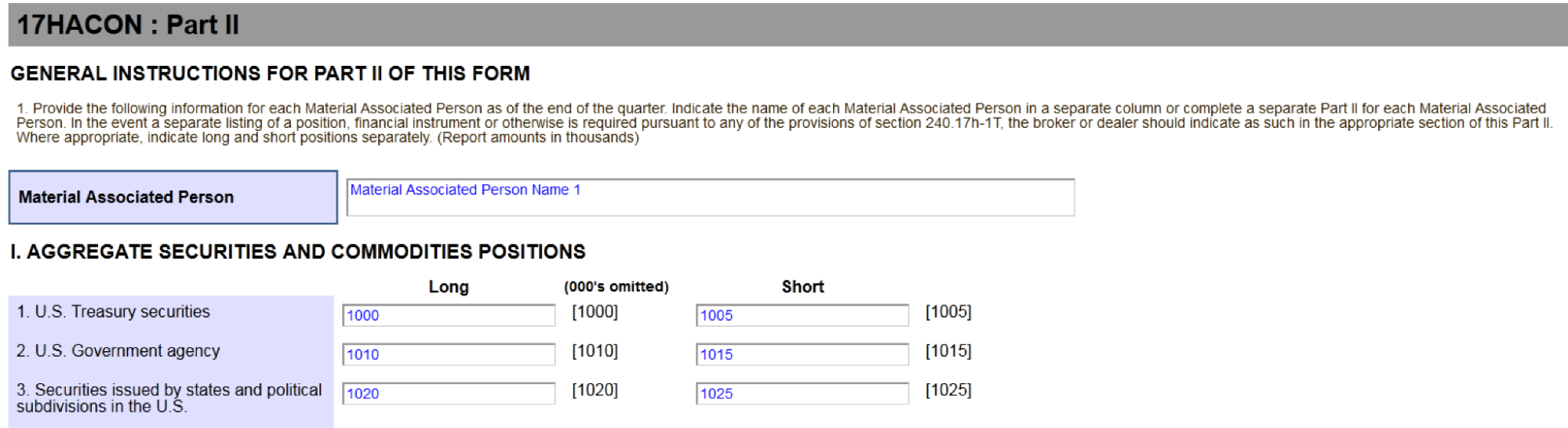
The spreadsheet layout follows the Form 17-H paper format, including the “selectors” or line numbers for each data point, such as [1000] for “U.S. Treasury securities, long position”.
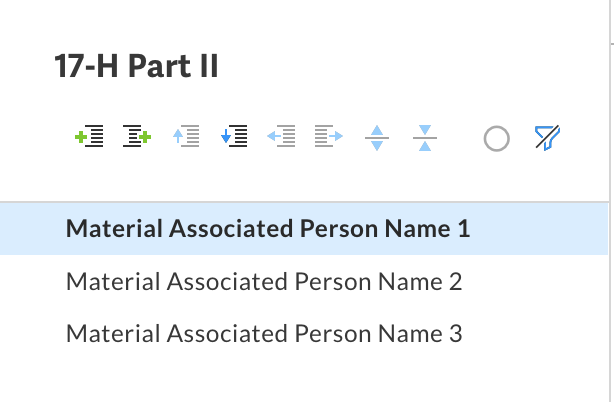
The sheet name is used to specify the Material Associated Person name, and the sheets can be duplicated to report for multiple MAP—but remember to update the sheet name to the correct MAP name. Empty sheets or sheets without selectors and/or values are ignored. Multiple spreadsheets may also be included in the filing.
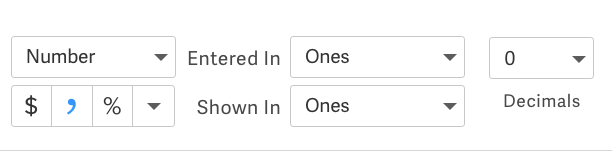
The data is generally provided as numbers, reported in thousands, with optional dollar signs and commas, and negative numbers reported either using the minus sign or ( ) accounting format. The values must be rounded to the nearest whole number. For example, to report a position of $1,234,567.89, the number “1234” or “1235” (depending on preference - the SEC typically rounds down) would be provided. Do not use the spreadsheet cell scaling factor to adjust the numbers - use Entered In: Ones, Shown In: Ones, Decimals: 0, and either Text or Number format.

Exhibits
17HACON and 17HQCON have a number of specialized exhibit/label types, several of which allow PDF documents to be filed as-is as official documents and not EDGARized. EDGAR’s PDF content rules apply for 17-H, therefore PDFs containing hyperlinks or other non-compliant items must be flattened, either using Workiva’s Flatten PDF feature or 3rd party applications such as Adobe Acrobat. EDGAR HTML and plain text documents are also allowed for all exhibit types, and multiple exhibits of the same type are allowed. Since 17-H is a confidential report, all exhibits and graphics submitted are also non-public.
Item 4’s FINSTMT is the only required exhibit, although ORGCHART, RISKMGMT, and LEGALPROC are required unless the corresponding “No material changes” data point is acknowledged for Item 1, Item 2, and Item 3 respectively. Note that ORGCHART is always required for the annual report, even if there have been no material changes.
Exhibit Label Name |
Description |
Required |
PDF Allowed |
| FINSTMT | Financial Statements / Item 4 | Required | Yes |
| ORGCHART | Organizational Chart / Item 1 | Required if “No material changes have occurred since last filed” is not selected. Always required for 17HACON filings, even if “No material changes have occurred since last filed” is selected. Otherwise, ORGCHART is Optional. | Yes |
| RISKMGMT | Risk Management / Item 2 | Required if “No material changes have occurred since last filed” is not selected. Otherwise, RISKMGMT is Optional. | Yes |
| LEGALPROC | Legal Proceedings / Item 3 | Required if “No material changes have occurred since last filed” is not selected. Otherwise, LEGALPROC is Optional. | Yes |
| OTHERCON | Other | Optional | Yes |
| CORRESP | Correspondence | Optional | Yes |
| COVER | Cover | Optional | Yes |
| GRAPHIC | Graphic | Optional | No |
| 17H-AGGR COMM DELTA | Aggregate Securities and Commodities Positions - Summary of delta or similar analysis | Optional | No |
| 17H-FWDS US TR / MBS | U.S. Treasury and mortgage‑backed securities - per counterparty breakdown | Optional | No |
| 17H-FWDS OTHER | Other forwards - per counterparty breakdown | Optional | No |
| 17H-INT RT SWP US | Interest Rate Swaps - U.S. dollar denominated swaps - per counterparty breakdown | Optional | No |
| 17H-INT RT SWP C CUR | Interest Rate Swaps - Cross currency swaps - per counterparty breakdown | Optional | No |
| 17H-FRGN SWP | Foreign exchange - Swaps - per counterparty breakdown | Optional | No |
| 17H-FRGN NOTC | Foreign exchange - Notional or contractual amounts of commitments to purchase foreign currencies and U.S. dollar exchange - per counterparty breakdown | Optional | No |
| 17H-SWAP OTHER | All other swap agreements (specify type) - schedule | Optional | No |
| 17H-SWAP OTHER PCB | All other swap agreements - per counterparty breakdown | Optional | No |
| 17H-COMD FWDS | Commodities - per counterparty breakdown | Optional | No |
| 17H-DELTA | Summary of delta or similar analysis | Optional | No |
| 17H-RISK CONC 105 | Listing, by amount, of significant concentrations of credit risk as defined in Statement of Financial Accounting Standards No. 105 | Optional | No |
| 17H-RE GEOG | Real Estate - listing by geographic region | Optional | No |
| 17H-RISK SINGLE | Information regarding risk concentration to a single borrower, location or property in the investment or loan portfolio | Optional if at least one value is provided in Part II.V.1.(a) to (e) or Part II.V.2.(a) to (e). Otherwise, 17H-RISK SINGLE is not allowed. | No |
| 17H-ADDTL ANSWRS | Material Associated Person - Additional space for answers | Optional | No |
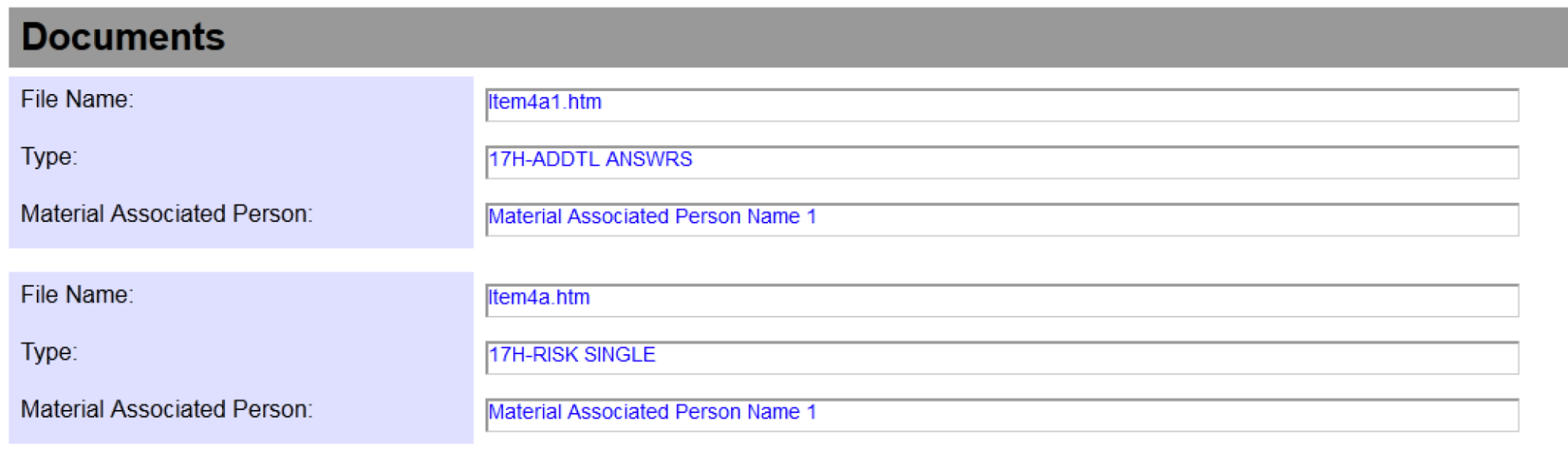
Exhibits with types that begin with “17H-”, such as 17H-RISK SINGLE, must be associated with a Material Associated Person which is filing in the report. For example, to associate the exhibit Item4a.htm with Material Associated Person 1, a user would create or upload the HTML exhibit, copy the filename from the Filing Experience, label it as the appropriate 17H-* type in the Label step, and add the filename under the Associate Exhibits with this Material Associated Person section of the template. The order is not important as long as the filename corresponds to a labeled exhibit in the Label step and is unique for each MAP.

Reviewing the Report Prior to Filing
After creating and labeling all necessary exhibits, completing the Part I information required in the Filing Wizard, and providing Part II information for one or more Material Associated Persons in the spreadsheet and including that in the Collect step, moving to the Review step will show a summary of the information as well as links to Preview and Validation Check. The Preview is a HTML representation of the XML data, which is actually transmitted to EDGAR, and the HTML preview is not itself filed. So if there are rendering or layout issues, this will not impact the filing - it is only the data shown which is important. The Validation Check link is important to verify prior to filing to ensure there are no errors with the Part II spreadsheet.
After test filing, the Test Filing Preview is available which also contains the HTML preview representation, XML data, as well as copies of all exhibits and any EDGAR error messages.
Review Step

It is possible to export the complete filing from Workiva and upload it into the SEC’s Form 17-H web application for review and/or filing. After the filing is packaged, select “Download EIS File” from the Download button in the Filing Experience and an .eis format file will be downloaded to your computer. You may then log into https://www.edgarfiling.sec.gov/ and select the “File 17-H” link in the left sidebar. Select the “Continue With Saved 17-H (stored on your computer)” option and upload the .eis file.
This PDF contains instructions on how to use the SEC’s EdgarLinkOnline web application with the Workiva generated .eis file. Note that a HTML preview is not available when test filing using the SEC’s web application, so you must be careful to ensure the filing is correct prior to submitting.
Important Links
- Workiva’s Form 17-H Part II spreadsheet template, which customers import into their Workspace, and add to the Filing Experience to report on their Part II data.
- Exchange Act Rule 17h-1T recordkeeping requirements
- Exchange Act Rule 17h-2T reporting requirements
- Final Rule 33-11342, describing the electronic filing requirements for 17-H
- Extension of Compliance Dates details, documenting the iXBRL requirements delayed until 2027.
- The paper version for 17-H, useful for reference.
- Form 17-H information from the EDGAR Filer Manual Vol 2
- The SEC’s “Tips for Filing Form 17(H) in EDGAR” guide. While this is specific to the SEC’s web application, it contains useful information about the data formats and requirements.
- Workiva’s Flatten PDF feature